
When you rely on hearing aids, the idea of slipping on a pair of headphones to watch a movie or listen to music can feel like inviting a feedback squeal or a muffled mess.
The concern isn’t hypothetical: many users report whistling loops, blocked ear ports, or bass that drowns out speech. The good news is that headphone designs have evolved to work respectfully alongside hearing wellness. This roundup walks through real compatibility considerations and highlights models that actually address those daily listening challenges.
Why Headphones Often Clash with Hearing Aids
The friction between headphones and hearing aids usually isn’t mysterious, it comes down to fit, signal overlap, and a few acoustic realities most shoppers don’t anticipate until they’re stuck with a squealing headset.
The Feedback Loop Problem
Feedback flares up when headphone audio leaks back into the hearing aid mic, turning a quiet moment into an instant high-pitched whine. Over-ear cups often press hearing aids flush against the skull, tightening the seal in just the wrong way.
In-ear tips can block the tiny vent ports built into many domes, leaving ears feeling plugged and sounds feeling flat. Open-back styles and bone conduction paths sidestep these clashes by design rather than hoping volume adjustments smooth them out.
Sound Quality Distortion Risks
Digital hearing aids already reshape incoming audio before it reaches your eardrum. Layering aggressive headphone gain on top can flatten speech or muddy consonants, especially in the midrange. Some users describe music feeling tinny, while others notice bass notes swallowing dialogue.
The fix isn’t always turning things down, sometimes it’s letting the hearing aid own the frequency shaping and letting the headphone deliver clean, lower-gain input.
- Place headphone cushions behind the hearing aid body to avoid pressure points.
- Start with low volume on both devices to prevent sudden loud spikes.
- Use transparency modes to maintain awareness of surrounding traffic noises.
- Avoid tight headbands that push hearing aid microphones out of alignment.
- Check for battery drain since running two audio systems consumes more power.
Top Devices to Pair with Your Hearing Aids
Selecting the right hardware solves the compatibility issues mentioned above instantly. These ten options range from dedicated amplifiers to smart earbuds featuring medical-grade hearing support. Each model addresses specific pain points like feedback, comfort, or connectivity.
Whether you need raw volume boost or seamless Bluetooth streaming, this list covers reliable solutions for daily use.
|
1
|
SuperEar SE5000 Hearing Amplifier for Seniors, Sound Amplifier, Headphones | Personal Soun |

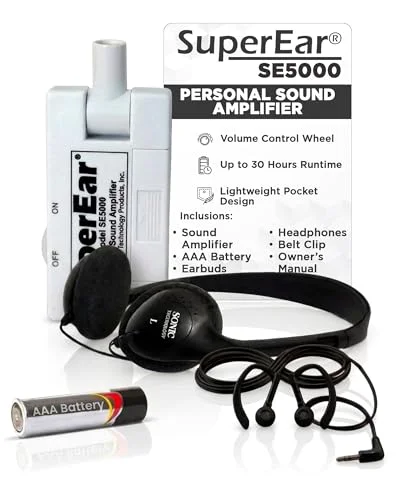
The SE5000 stays external to your hearing setup, amplifying room audio rather than trying to drive it through the hearing aid itself.
The SuperEar SE5000 is a personal amplifier through and through: a swiveling mic captures ambient sound and routes it through the included stereo headphones or earbuds. That separation matters for hearing aid wearers, since it sidesteps the feedback loop that kills so many headphone pairings.
The tactile volume wheel gives immediate control up to roughly 50 dB of gain, so TV dialogue doesn’t require maxing two volume knobs at once.
This one lands squarely in the living-room-TV category. The belt clip keeps it handy, and the 30-hour battery run easily carries you past an evening binge. Just know it doesn’t pair over Bluetooth, so you’ll need to stay close to whatever speaker is feeding it.
|
2
|
Apple AirPods Pro 3 Wireless Earbuds with Active Noise Cancellation | Live Translation, He |
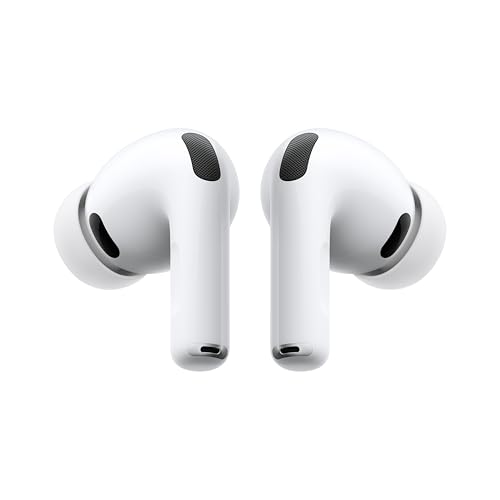
Apple’s Hearing Aid feature in Transparency mode gives it a foot in the accessibility room that most consumer earbuds lack.
AirPods Pro 3 double as FDA-cleared hearing aids through a Hearing Aid mode that leans on onboard processing to lift speech while dampening clutter. Toggle into Transparency when you need that assistance, and back out when you just want ANC for a flight.
The USB-C case keeps the party going around ten hours in that mode, which is enough for most commutes or coffee-shop sessions.
For iPhone-first households this is the most polished bridge between music and aid support. Live Translate and the Workout Buddy features feel like bonuses rather than necessities, and the multiple ear tip sizes let you dial in a fit that doesn’t fight with your existing dome.
|
3
|
mocodi Bone Conduction Hearing Amplifier Seniors & Adults for Bluetooth – Open-Ear Design |

Bone conduction keeps the ear canal open, so hearing aid ports stay unblocked and ambient audio still reaches you naturally.
Mocodi leans into bone conduction as the core compatibility strategy, vibrating the cheekbone so your cochlea gets sound without anything pressing into your hearing aid. Bluetooth 5. 3 handles streaming duties, and that open-ear stance keeps you aware of traffic or kitchen timers, something solid ear cups tend to kill.
The Ni-Ti memory wire frame settles in without slipping, even when you’re moving around the house.
This is the model I’d shortlist for walkers, cooks, or anyone who needs to stay situationally aware. Bass won’t punch like an in-ear seal, and the vibration against your skin takes a day or two to feel normal, but that tradeoff seems worth it for avoiding feedback entirely.
|
4
|
Aurimi Bone Conduction Hearing Amplifier, Open Ear Amplifier for Seniors | Lightweight 25g |
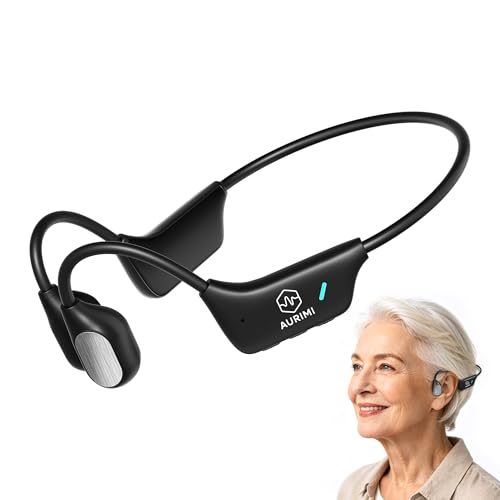
At 25 grams the design takes pressure off the delicate area behind the ears where hearing aids already rest.
Aurimi keeps the feature list tight on purpose: a single button, bone conduction, and magnetic charging. That simplicity translates well for seniors juggling several devices at once.
The open-ear path means no physical battle with hearing aid domes, and ten hours of playback handles a full afternoon of TV or a family dinner without hunting for a charger.
Comfort over long sessions is the real win here, especially with the skin-friendly materials behind the ear. If you‘re hoping for an app with a five-band EQ, you’ll be disappointed, but then again, so many hearing aid users just want something that works straight out of the case.
|
5
|
Williams Sound PockeTalker Ultra DUO Sound Amplifier with Headphone & Earbud |

The long tether and external mic placement physically separate the audio source from your hearing aid mic.
Williams Sound’s PockeTalker Ultra DUO leans into wired reliability: a 12-foot TV cord, 20-40 dB of gain, and both a headset and single earbud so you can choose your seal style.
Volume and tone sit outside the unit, so you’re tweaking levels from your lap instead of fumbling with tiny hardware. The standout spec remains the 100-hour battery life, months of usage on a set of AAA cells if you’re mainly doing evening TV.
This feels purpose-built for sedentary, seated listening scenarios. Wireless freedom isn’t its strength, but neither is feedback whistling when your phone buzzes across the room. Five-year warranty is a quiet signal that this one’s meant to stick around.
|
6
|
Blue Deer Bluetooth Bone Conduction Hearing Amplifiers for Seniors Open Ear | Lightweight |

Separate earpiece controls let you match output to each ear when hearing loss isn’t symmetrical.
This one’s clearly aimed at uneven hearing profiles, and the dedicated +/- buttons per side cut straight to that need without app gymnastics. Fast charging tops off quickly enough for errands, and IPX5 handles the usual splash scenarios.
Only caveat: the cheekbone buzz feels foreign for the first wear, so give it a day before deciding it’s a dealbreaker.
Great for users requiring distinct amplification levels for each ear due to varying degrees of loss. Fast charging capabilities restore power quickly for unexpected listening needs throughout the day. IPX5 water resistance safeguards against accidental splashes during errands or exercise routines.
Some users may find the cheekbone vibration sensation unusual during initial adaptation periods.
|
7
|
Hearing Aids for Seniors, Rechargeable Bluetooth with APP Control | Auto Noise Cancelling |
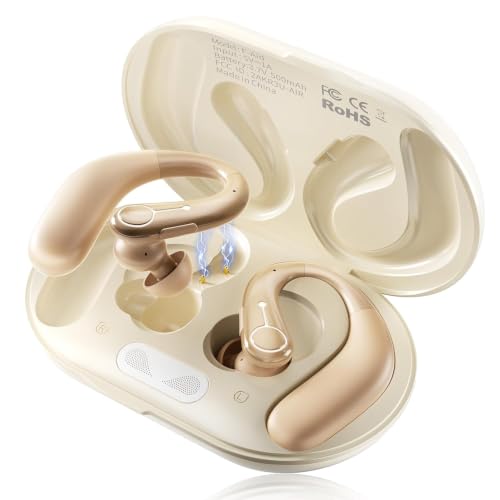
The app is doing the heavy lifting here, tuning suppression and gain so it complements an existing prescription.
This hybrid entry blurs the line between hearing aid and headphone, using sixteen-channel processing to separate speech from noise across three modes. An app handles the fitting profile, so you can dial in zero to max volume digitally without a trip to an audiologist.
Visually it passes as a pair of premium earbuds, which helps if stigma is part of your calculus.
I’d put this near the top of the transition category, people moving from dedicated aids into something more lifestyle-friendly. Auto noise suppression works well enough in cafes or on busy streets, but anyone uncomfortable with app-based setup may stall on the initial configuration screen.
|
8
|
Elite Package: Reizen Loud Ear 120dB Gain Personal Amplifier |
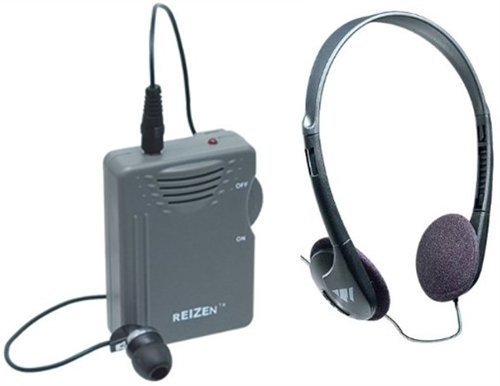
That 120 dB ceiling speaks to users with profound loss who hit the ceiling on consumer headphone output.
Reizen’s Loud Ear is straightforward in intent: pull in distant or quiet audio and make it loud enough that it cuts through.
The built-in mic feeds straight to either the mini earphones or the full-size headphones in the box, and gain can climb to about 120 dB when the situation calls for it. It isn’t subtle, but it doesn’t need to be.
You can hear a whisper from across a room or catch a muted TV without cranking the source. Simplicity is this model’s strength, two AAA batteries, no pairing drama. The bulk is the tradeoff, and if you commute daily it’ll feel like a pocket weight you’d rather leave behind.
|
9
|
Bone Conduction Hearing Aids for Seniors and Adults,Open-Ear | Hearing Amplifier,Hearing P |

Open-ear conduction sidesteps the moisture trap that in-canal aids tend to create over long wear.
These bone conduction aids rest behind the ear and route sound to the cochlea without sealing off the canal. That openness matters over an all-day wear cycle, since trapped moisture and pressure are two complaints that consistently surface with traditional domes.
Directional mics keep conversations upfront while backing off surrounding noise, and the unit works immediately out of the box, no professional fitting required.
For users prone to irritation or minor infections from in-canal wear, this feels like the gentler option. Twenty hours keeps multi-day usage realistic between charges. Just don’t expect deep, warm bass from the conduction path; it’s present, but not the priority.
|
10
|
Williams Sound Pocketalker 2.0 Hearing Amplifier | Easy-to-Use Hearing Amplifier for Senio |

The control layout leans simple, which lines up with what many seniors actually want from a listening device.
Williams Sound’s Pocketalker 2.0 is about as stripped-down as amplified listening gets: headphones and earbuds in the box, straightforward interface, and enough gain to cut through mild background chatter. The form factor slips into a pocket or small bag, so it travels better than the heavier desktop units.
I’d recommend it for focused one-on-one moments or TV listening where wireless range isn’t a factor. Output clarity holds up well for speech, and the build feels durable enough to take the bumps that come with daily senior use. Lose the wireless freedom, though, and you’re anchored to source proximity.
What becomes clear across these ten is that headphone-and-hearing-aid coexistence isn’t a matter of luck, it’s largely about which kind of conflict you’re trying to avoid. Bone conduction sidesteps feedback; dedicated amplifiers add punch where Bluetooth range is irrelevant; smart earbuds smooth over the integration gap for phone-first households.
Optimizing Audio Settings for Dual Device Use
Once the hardware lands, a few placement and volume habits make the difference between a clean listen and a feedback flare-up.
Insert your hearing aids first and ensure they are seated comfortably in your ears.
Place the headphones over or around the hearing aids without pressing them inward hard.
Turn on the hearing aid volume to a moderate baseline level before starting audio.
Gradually increase the headphone volume until speech becomes clear without whistling.
Test movement by turning your head side to side to check for shifting or feedback.
Start by rotating an over-ear cup slightly behind the hearing aid body, so the speaker isn’t pressing directly into the mic port. If you’re using in-ears, make sure the tip isn’t shoving the dome deeper into the canal.
Digital hearing aids sometimes react poorly to magnetic drivers, so switching to microphone mode can quiet the distortion that sneaks in at higher volumes. On a practical note, keeping wax guards clean does wonders for clarity when two audio sources are sharing the same path.
Long-Term Maintenance and Battery Management
Running an amplifier or streaming headphones alongside hearing aids will naturally shorten battery windows on both sides.
Battery Expectations for Combined Use
| Device Type | Typical Single Use | Combined Use Estimate |
|---|---|---|
| Rechargeable Hearing Aids | 24 Hours | 16-18 Hours |
| Bluetooth Earbuds | 6 Hours | 4-5 Hours |
| AAA Amplifiers | 100 Hours | 60-70 Hours |
- Charge both devices overnight to start every morning with full power reserves.
- Keep spare AAA batteries handy for emergency amplification needs during travel.
- Wipe down headphone cushions regularly to remove oils that degrade foam quickly.
- Store devices in dry cases to prevent moisture damage from sweat accumulation.
- Inspect hearing aid tubes weekly for cracks caused by headphone pressure.
Yes, headphones and hearing aids can share the same listening session, you just need gear that respects how they’re meant to coexist. If you’re unsure where to start, a bone conduction pair removes the majority of compatibility friction and usually feels like an easy first win.

Leave a Reply