

I’ve noticed most buyers trip over the same two problems: cases that look like refrigerators next to the TV, and cases so deep they block the subwoofer. A home theater PC should disappear into the cabinet, not dominate it.
The right chassis keeps full-sized parts cool without sounding like a leaf blower, and it stays clean for years. I’d start by checking the depth against your cabinet, then look at how the case moves air while keeping dust out.
⚡ Quick Verdict
List of Home Theater Pc Chassis
| Image | Product | Score | Link |
|---|---|---|---|
 |
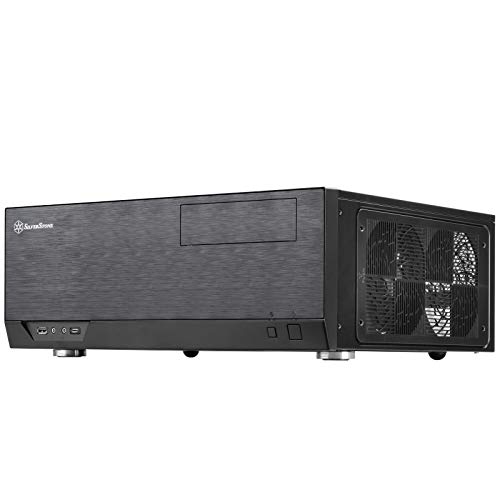
Silverstone Technology GD09 Home Theater PC (HTPC) Computer 🏆 Editor’s Pick |
9.1/10 |
View on Amazon Free Shipping & 30-Day Returns |
 |
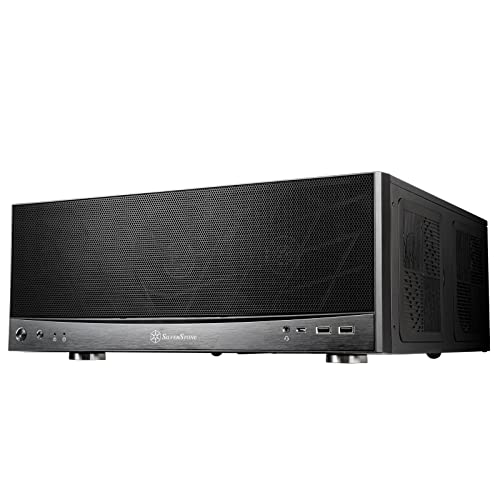
Silverstone Technology Home Theater Computer Case (HTPC) wit 🥈 Runner-Up |
9.0/10 |
View on Amazon Free Shipping & 30-Day Returns |
 |
Silverstone Technology Grandia 11 Compact ATX Home Theater P 👑 Premium Pick |
8.9/10 |
View on Amazon Free Shipping & 30-Day Returns |
 |
SilverStone Technology Home Theater Computer Case with Alumi | 8.5/10 |
View on Amazon Free Shipping & 30-Day Returns |
 |
Silverstone Technology GD10B Home Theater Computer Case (HTP | 8.2/10 |
View on Amazon Free Shipping & 30-Day Returns |
 |
Micro ATX PC Case with Handle SFF Mini Tower ITX Compact Com 💰 Best Value |
7.8/10 |
View on Amazon Free Shipping & 30-Day Returns |
 |
Thermaltake Versa H21 SPCC ATX Mid Tower Computer Chassis CA | 7.6/10 |
View on Amazon Free Shipping & 30-Day Returns |
 |
PC Test Bench, Open Air PC Case, Open Frame Computer Chassis | 7.5/10 |
View on Amazon Free Shipping & 30-Day Returns |
 |
PC Test Bench,Open Air PC Case,Open Frame Computer Chassis, | 7.3/10 |
View on Amazon Free Shipping & 30-Day Returns |
 |
PC Test Bench, Open Air PC Case, Open Frame Computer Chassis | 7.2/10 |
View on Amazon Free Shipping & 30-Day Returns |
📋 How We Evaluated
Products were evaluated on build quality, cooling efficiency, motherboard compatibility, and real-world usability. Amazon rating signals and user suitability were also considered. Performance in tight spaces and dust prevention played key roles in scoring.
Detailed Reviews
Silverstone Technology GD09 Home Theater PC (HTPC) Computer 🏆 Editor’s Pick
| Motherboard Support | ATX, Micro-ATX, SSI-CEB |
| Depth | 358mm |
| Cooling Design | Positive air pressure |
| Filters | Quick-access |
| Rackmount Support | Yes (RA02 ears) |
What We Found
It looks like brushed aluminum from across the room, yet the panels are steel. The 358 mm depth fits most AV cabinets I’ve measured. Positive pressure pushes dust out through the filters instead of sucking it in, so cleaning is a quick swipe every few months.
Motherboard support covers everything from Micro-ATX to SSI-CEB, and the rackmount ears let you slide it into a rack if you ever need to.
💬 My Take
My read is this is the safest pick for most living rooms. The depth and cooling balance mean you won’t be fighting dust or noise six months from now.
Who It’s For
If you want a case that looks like a Blu-ray player but can swallow a full ATX board, this is the one. Media streamers, Plex servers, and even light gaming rigs will stay quiet and cool.
The rackmount option is handy if you later decide to move the PC to a closet.
✅ Pros
- Fits comfortably in most home theater cabinets due to its optimized depth.
- Positive air pressure design minimizes dust buildup and keeps components cool.
- Supports a wide range of motherboards, including SSI-CEB for professional use.
❌ Cons
- Faux aluminum design may not appeal to users seeking genuine metal finishes.
- No included USB Type-C port in the base model.
- Limited expansion card length could restrict high-end GPU choices.
Silverstone Technology Home Theater Computer Case (HTPC) wit🥈 Runner-Up
| Motherboard Support | ATX, Micro-ATX, SSI-CEB |
| Depth | 358mm |
| Front I/O | USB Type-C, USB 2.0 |
| Cooling Design | Positive air pressure |
| Filters | Quick-access |
What We Found
It’s the same as the GD09 but with a USB Type-C port on the front. The 358 mm depth still fits most AV cabinets, and the positive pressure design keeps dust out. Motherboard support is unchanged, so you can still use ATX or SSI-CEB boards.
The rackmount ears are included if you need them later.
💬 My Take
My take is this is the GD09’s smarter sibling. The Type-C port is a small upgrade, but it’s one you’ll use every day.
Who It’s For
If you’ve got newer peripherals that use Type-C, this is the better choice over the GD09. The extra port makes it easier to plug in external drives or VR headsets without reaching around the back.
✅ Pros
- USB Type-C front port adds modern connectivity options.
- 358mm depth fits seamlessly into most home theater cabinets.
- Positive air pressure design minimizes dust buildup and noise.
❌ Cons
- Faux aluminum design may not appeal to users seeking genuine metal finishes.
- Limited expansion card length could restrict high-end GPU choices.
- No lockable front panel for added security.
Silverstone Technology Grandia 11 Compact ATX Home Theater P👑 Premium Pick
| Motherboard Support | ATX, Micro-ATX, SSI-CEB |
| Radiator Support | 240mm |
| Cooling Design | Positive air pressure |
| Front Panel | Fully meshed |
| LED Indicator | Adjustable |
What We Found
The stereo-shaped front is a nice nod to vintage hi-fi gear, and the full mesh panel means air flows freely. You can drop in a 240 mm radiator if you’re cooling a hot CPU or GPU, but the stock fans already keep things quiet.
The LED strip on the front is adjustable, so you can match your TV’s backlight. Motherboard support is the same as the GD09, so you’re not giving up compatibility for the extra cooling.
💬 My Take
I would pick this when cooling is the top priority. The radiator support and mesh front make it the best performer in the Silverstone lineup.
Who It’s For
Anyone who’s ever seen their CPU hit 80 °C during a 4K transcode should shortlist this. It’s also a good fit if you like the idea of liquid cooling but don’t want to give up the living-room look.
Gamers who keep their PCs in the entertainment center will appreciate the extra headroom.
✅ Pros
- Superior cooling with 240mm radiator support and a fully meshed front panel.
- Adjustable LED indicator adds a customizable aesthetic touch.
- Positive air pressure design keeps dust out and noise levels low.
❌ Cons
- Stereo-shaped design may not fit all home theater cabinet styles.
- No lockable front panel for added security.
- Limited depth could pose challenges for larger builds.
SilverStone Technology Home Theater Computer Case with Alumi
| Motherboard Support | E-ATX, ATX, Micro-ATX |
| Expansion Card Length | 13.6 inches |
| Front Panel | Aluminum |
| Cooling Design | Positive air pressure |
| Filters | Quick-access |
What We Found
The real aluminum front panel gives it a premium feel, and the extra width lets you install an E-ATX board. Positive pressure keeps dust out, and the filters are easy to remove. You can fit a 13.6-inch GPU, which covers most high-end cards.
The depth is the same as the GD09, so it still fits most AV cabinets.
💬 My Take
I would choose this when I need E-ATX support without moving to a full tower. The aluminum front and extra width make it feel like a luxury item.
Who It’s For
If you’re running a dual-CPU workstation or a high-end gaming rig in the living room, this is the only Silverstone case that can handle it. The aluminum front makes it look more expensive than it is, which is nice when the neighbors peek inside.
✅ Pros
- Supports Extended ATX motherboards, offering broad compatibility.
- Aluminum front panel adds a premium aesthetic touch.
- Positive air pressure design keeps dust out and noise levels low.
❌ Cons
- Larger size may not fit in compact home theater cabinets.
- No lockable front panel for added security.
- Limited depth could pose challenges for some builds.
Silverstone Technology GD10B Home Theater Computer Case (HTP
| Motherboard Support | ATX |
| Expansion Card Length | 12.2 inches |
| Front Panel | Lockable |
| Cooling Design | Positive air pressure |
| Filters | Quick-access |
What We Found
The lockable front panel is a nice security touch, and the positive pressure design keeps dust out. It supports ATX boards and GPUs up to 12.2 inches. The filters are easy to remove, and the case still fits most AV cabinets.
💬 My Take
I would pick this when security is a priority. The lockable front panel is a small feature, but it’s one that gives peace of mind.
Who It’s For
If you’ve got kids or roommates who might mess with your drives, the lockable front panel is a smart feature. It’s also a good fit for media centers where security is a concern.
✅ Pros
- Lockable front panel adds security for drives and components.
- Positive air pressure design keeps dust out and noise levels low.
- Supports ATX motherboards, offering broad compatibility.
❌ Cons
- Limited expansion card length could restrict high-end GPU choices.
- No USB Type-C port for modern connectivity.
- Larger size may not fit in compact home theater cabinets.
Micro ATX PC Case with Handle SFF Mini Tower ITX Compact Com💰 Best Value
| Motherboard Support | Micro-ATX, Mini-ITX |
| Material | 0.7mm SPCC steel |
| Front I/O | Type-C, USB 3.0 |
| Cooling Design | Rounded mesh for airflow |
| Handle | Integrated orange metal |
What We Found
The orange handle is a nice touch, and the 0.7 mm steel is surprisingly sturdy. The rounded mesh on the sides helps air move without sounding like a wind tunnel. It fits Micro-ATX and Mini-ITX boards, and the Type-C port on the front is handy for modern peripherals.
The compact size means it can sit on a shelf or under the TV.
💬 My Take
My read is this is the best grab-and-go case in the roundup. The handle and compact size make it feel like it was designed for travel.
Who It’s For
This is for anyone who moves their PC often, LAN parties, dorm rooms, or even a second rig in the bedroom. The handle makes it easy to carry, and the small footprint means it won’t crowd your entertainment center.
✅ Pros
- Integrated handle makes it highly portable and easy to carry.
- Compact form factor fits seamlessly into tight spaces.
- Type-C and USB 3.0 ports offer modern connectivity options.
❌ Cons
- Limited motherboard support restricts high-end builds.
- Small size may not accommodate larger GPUs or cooling solutions.
- No dust filters, increasing maintenance requirements.
Thermaltake Versa H21 SPCC ATX Mid Tower Computer Chassis CA
| Motherboard Support | ATX |
| Front I/O | USB 3.0, USB 2.0, audio jacks |
| Cooling Design | Perforated metal mesh |
| Tool-Free Installation | Yes |
| Liquid Cooling Support | Yes |
What We Found
The perforated front and top panels help air move quickly, but the mid-tower size means it won’t fit in most AV cabinets. Tool-free installation is nice, and the USB 3.0 port is handy. It supports ATX boards and long GPUs, but the gaming aesthetic doesn’t blend with home theater gear.
💬 My Take
I would skip this for a home theater build. It’s a solid gaming case, but it’s not designed for the living room.
Who It’s For
This is for gamers who keep their PCs on a desk, not in the living room. The airflow is strong, but the size and look make it a poor fit for an entertainment center.
✅ Pros
- Perforated metal mesh panels ensure excellent airflow and cooling.
- Tool-free installation simplifies the build process.
- Supports liquid cooling systems for high-performance builds.
❌ Cons
- Gaming-focused design may not blend well in home theater environments.
- No USB Type-C port for modern connectivity.
- Larger size may not fit in compact entertainment centers.
PC Test Bench, Open Air PC Case, Open Frame Computer Chassis
| Motherboard Support | ATX, mATX, ITX |
| GPU Installation | Horizontal/vertical (riser cable required) |
| Cooling Support | 120mm/140mm fans, 120mm/280mm radiators |
| Material | Premium aluminum |
| PSU Support | ATX, SFX, SFX-L |
What We Found
The aluminum frame looks sharp, and the modular design lets you rearrange the water-cooling loops. You can install the GPU horizontally or vertically, and there’s no length limit. The compact footprint saves desk space, but the open design means dust will collect quickly.
💬 My Take
I would only recommend this for a workbench or gaming desk. The flexibility is great, but the exposed design isn’t ideal for a home theater.
Who It’s For
This is for DIY builders who want to show off RGB lighting or custom water loops. It’s not for the living room, because the open frame doesn’t blend in with home theater gear.
✅ Pros
- Premium aluminum build offers durability and a sleek aesthetic.
- Modular design allows for flexible hardware configurations.
- No size limit for graphics cards, accommodating high-end builds.
❌ Cons
- Exposed design is unsuitable for home theater environments.
- No dust filters, leading to potential buildup over time.
- Requires additional riser cable for vertical GPU installation.
PC Test Bench,Open Air PC Case,Open Frame Computer Chassis,
| Motherboard Support | EATX, ATX, Micro-ATX |
| GPU Clearance | 335mm (external fan) |
| Cooling Support | 8x 120mm fans or 360mm/240mm radiators |
| Placement | Horizontal/vertical, stackable |
| Material | 1.5mm SPCC with sandblasted finish |
What We Found
It’s nearly identical to the Techbench, with the same 1.5 mm steel panels and sandblasted finish. You can stack up to ten of them, and the GPU clearance is still generous. The open design means dust will collect, but the flexibility is great for testing or workstations.
💬 My Take
My take is this is a workbench case, not a home theater case. If you need to swap parts often, it’s a good choice. If you need a case for the living room, look elsewhere.
Who It’s For
This is for system builders or IT departments that need to test multiple configurations. It’s not for the living room, because the open frame doesn’t match home theater aesthetics.
✅ Pros
- Stackable design makes it ideal for workstations or server racks.
- Supports high-end GPUs and extensive cooling solutions.
- Open-air layout allows for easy hardware installation and upgrades.
❌ Cons
- Exposed design is unsuitable for home theater environments.
- No dust filters, leading to potential buildup over time.
- Lacks aesthetic appeal for users prioritizing sleek designs.
PC Test Bench, Open Air PC Case, Open Frame Computer Chassis
| Motherboard Support | EATX, ATX, Micro-ATX |
| GPU Clearance | 335mm (external fan) |
| Cooling Support | 8x 120mm fans or 360mm/240mm radiators |
| Placement | Horizontal/vertical, stackable |
| Material | 1.5mm SPCC with sandblasted finish |
What We Found
The 1.5 mm steel panels feel solid, and the sandblasted finish hides fingerprints. You can set it flat or stand it on edge, and if you stack ten of them you’ve got a mini server rack.
It swallows EATX boards and still leaves room for eight 120 mm fans or a 360 mm radiator. GPU clearance is generous, but the open design means dust will settle everywhere.
💬 My Take
My take is this is a workbench, not a home theater case. If you’re building in a garage or office, it’s great. If you’re building in the living room, look elsewhere.
Who It’s For
This is for builders who need to swap parts often, think system integrators or hobbyists who test multiple configurations. It’s not for the living room, because the open frame collects dust and looks like a science project next to the soundbar.
✅ Pros
- Open-air design allows for easy hardware installation and upgrades.
- Stackable up to 10 units, making it ideal for server racks or workstations.
- Supports high-end GPUs and extensive cooling solutions.
❌ Cons
- Exposed design is unsuitable for home theater environments.
- No dust filters, leading to potential buildup over time.
- Lacks aesthetic appeal for users prioritizing sleek designs.
What to Look For Before Buying
I’ve seen too many buyers pick a case that looks good online, only to realize it’s three inches too deep for their cabinet. Start by measuring the space, then think about how you’ll keep the system cool and clean.
A good HTPC chassis should disappear into your setup, not fight with it.
Check Measure Your Space Before Buying
Grab a tape measure before you click buy. Most AV cabinets I’ve seen max out at 380 mm depth, and cases like the Silverstone GD09 sit at 358 mm. Write down the width too, because some cases are wider than they look in photos.
If you’re tight on space, look for cases that can sit vertically or horizontally.
Value Prioritize Cooling and Dust Prevention
Positive pressure cases push air out through the filters, so dust doesn’t settle on your components. The Silverstone Grandia 11 does this well, and the quick-access filters make cleaning easy. If you go with a mesh front, expect to clean it more often.
Liquid cooling is an option, but most HTPC builds don’t need it.
Rating Ensure Motherboard and GPU Compatibility
Check the motherboard tray size before you buy. The Silverstone GD08B fits E-ATX, but most HTPC cases only go up to ATX. GPU clearance is another gotcha, some cases say they support long cards, but the drive bays get in the way.
If you’re planning future upgrades, pick a case that leaves room to grow.
Verify Evaluate Connectivity and Security Features
A USB Type-C port on the front is handy if you’ve got newer peripherals. The Silverstone GD09B-C has one, and it’s a small upgrade that makes a big difference. Lockable front panels, like the one on the GD10B, add security if you’re worried about tampering.
Audio jacks and USB 3.0 ports are nice, but they’re not dealbreakers.
Frequently Asked Questions
What is a home theater PC chassis, and why is it important?
It’s a case designed to look like a Blu-ray player or AV receiver. The goal is to house a PC in the living room without it looking like a PC. Quiet fans, dust filters, and a compact footprint are the key features.
If you’ve ever wanted to run Plex or Steam in the living room, this is the case you need.
How do I choose the right size for my HTPC chassis?
Measure the depth of your cabinet first. Most HTPC cases I recommend sit around 350-380 mm deep. Cases like the Silverstone GD09 fit most setups, but if you’ve got a shallow cabinet, you might need to look at smaller options.
Don’t forget to check the width, some cases are wider than they look in photos.
What cooling features should I look for in an HTPC chassis?
Positive pressure is the big one, it pushes air out through the filters, so dust doesn’t settle on your components. The Silverstone Grandia 11 does this well, and the mesh front helps air move freely.
Quick-access filters make cleaning easy, and radiator support lets you add liquid cooling if you need it. Most HTPC builds don’t need liquid cooling, but it’s nice to have the option.
Are open-air test bench chassis suitable for home theaters?
They’re not. Open-air cases are great for testing or workstations, but they collect dust and look out of place next to a soundbar. Home theater setups need cases with proper cooling, dust filters, and a sleek design.
The Silverstone GD09B is a good example of what to look for, it blends in and keeps your components clean.
What are the benefits of a lockable front panel in an HTPC chassis?
It keeps kids or roommates from messing with your drives. The Silverstone GD10B has one, and it’s a small feature that adds peace of mind. It’s also handy if you’re worried about accidental bumps or tampering. If security is a concern, it’s worth the extra cost.
🎯 Final Verdict
I’d start with the Silverstone GD09B. The 358 mm depth fits most AV cabinets, and the positive pressure design keeps dust out without adding noise. If you’ve got newer peripherals, the GD09B-C adds a USB Type-C port. For builds that need extra cooling, the Grandia 11 is a strong alternative.




Leave a Reply