
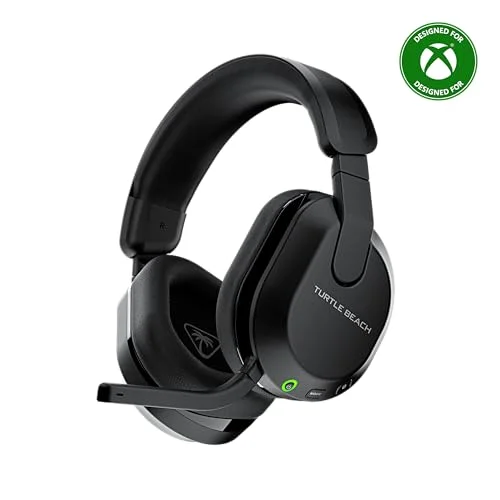
If you’ve tried pairing standard Bluetooth headphones to an Xbox One, you’ve likely hit a dead end. The console doesn’t support Bluetooth audio natively, which forces you to look for workarounds.
This guide breaks down why that limitation exists and highlights headsets that bridge the gap using wireless adapters, dual-mode connectivity, or Xbox-approved protocols.
Why Xbox One Blocks Bluetooth Audio
The Xbox One’s Bluetooth radio is reserved for controllers and accessories, not audio. Microsoft made this choice to prioritize low-latency connections for gaming. Here’s what that means for your headphone setup and how to navigate around it.
While the Xbox One does have a Bluetooth radio, it’s locked to input devices like controllers, keyboards, and mice. Audio output is intentionally excluded to maintain strict latency standards for competitive play. Standard Bluetooth headphones often lack the bandwidth and speed for real-time audio sync, which can disrupt gameplay.
Microsoft’s solution was to restrict audio to proprietary wireless protocols or wired connections. This ensures smooth multiplayer sessions, even if it limits which headphones you can use.
- Pairing standard Bluetooth-only headphones directly to the console
- Using a phone’s Bluetooth connection to relay audio to the Xbox
- Assuming all wireless headsets support Xbox’s proprietary wireless standard
- Expecting third-party Bluetooth dongles to enable native audio pairing
The Workarounds That Enable Bluetooth
To use Bluetooth-style convenience with an Xbox One, you need a bridge. Some headsets include Xbox wireless adapters, while others support dual-mode connectivity. Here’s how these solutions differ and what to look for.
Comparison of Bluetooth Workarounds for Xbox One
| Method | How It Works | Latency Impact | Compatibility |
|---|---|---|---|
| Xbox Wireless Adapter | Uses proprietary 2.4GHz dongle for Xbox audio | Ultra-low (≤20ms) | Xbox consoles only |
| Dual-Mode Headsets | Switch between Xbox wireless and Bluetooth | Low (≤20ms in wireless mode) | Xbox, PC, mobile |
| Bluetooth Transmitter | Plugs into controller’s 3.5mm jack | Moderate (50-100ms) | Any Bluetooth headphones |
| Wired Connection | 3.5mm audio jack to controller | None | Any wired headphones |
Dual-mode headsets are often the most versatile solution for Xbox One users who want Bluetooth flexibility. These devices connect to the console via a proprietary wireless dongle or direct pairing, then switch to Bluetooth mode for mobile or PC use.
The key is ensuring the headset’s wireless mode is designed for Xbox, not just generic Bluetooth. Adapters like the Xbox Wireless Adapter or headset-specific dongles create a low-latency link that mimics the console’s native audio output.
Without this, audio lag can make games unplayable, especially in fast-paced genres like shooters or racing.
Headsets That Bridge Bluetooth to Xbox One
These headsets solve the Xbox One’s Bluetooth limitation by offering dual-mode connectivity, proprietary wireless adapters, or direct console pairing. Each one lets you use Bluetooth for mobile or PC while maintaining a seamless Xbox audio connection.
|
1
|
Turtle Beach Stealth 600 Wireless Gaming Headset for Xbox, PS5, PC, Mobile | Xbox Series X |
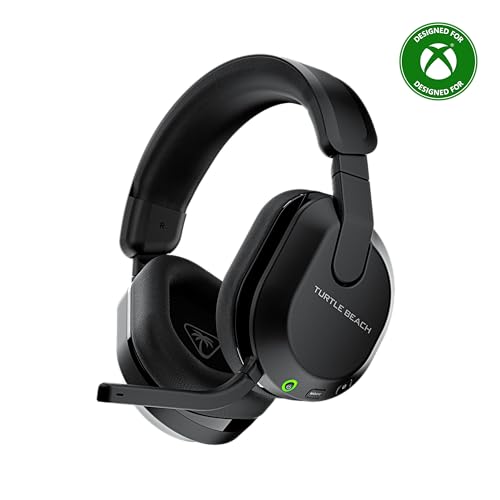
Switches between Xbox wireless and Bluetooth with a QuickSwitch button for seamless audio.
The Turtle Beach Stealth 600 uses a proprietary wireless connection for Xbox One, ensuring low-latency audio. Its QuickSwitch button lets you toggle to Bluetooth mode for mobile or PC use without disconnecting from the console.
With 50mm drivers and up to 80 hours of battery life, it’s a strong pick for long gaming sessions. The glasses-friendly memory foam cushions also add comfort for extended wear.
This headset excels for gamers who want one device for both Xbox and mobile. The flip-to-mute mic with AI noise reduction keeps team chat clear. However, the lack of a 3. 5mm jack means there’s no wired fallback.
Its multiplatform design suits those who game across Xbox, PlayStation, and PC, though the Bluetooth range is limited to about 30 feet.
|
2
|
Wireless Gaming Headset for Xbox Series X|S, Xbox One, PS5, PS4, Blackgreen | Bluetooth 5. |

Dual-lock dongle enables Xbox wireless audio while supporting Bluetooth 5.3 for mobile.
The Captain 200 connects to Xbox One via a dedicated dongle, delivering low-latency audio (≤20ms). Its Bluetooth 5. 3 mode works for mobile devices, and the 50mm drivers provide clear sound. The detachable ENC microphone reduces background noise, and the rotatable earmuffs ease pressure during long sessions.
A 45-hour battery life covers extended gaming marathons.
It’s ideal for Xbox players who also want mobile compatibility. The ergonomic design and quick-charge feature (2. 5 hours for full power) are standouts. However, the microphone isn’t supported on Nintendo Switch, and the dongle must be fully inserted to avoid connection drops.
The headset’s bulky design may not suit all users.
|
3
|
Gvyugke Wireless Gaming Headset for Xbox Series X/S, Xbox One, PS5 – Black | Flip-to-Mute |

Triple-mode connectivity includes 2.4GHz for Xbox and Bluetooth 6.0 for mobile devices.
The Gvyugke Captain 560 uses a 2. 4GHz dongle for Xbox One, ensuring stable, low-latency audio. Bluetooth 6. 0 mode supports mobile devices, and the 50mm drivers deliver immersive 3D surround sound. The flip-to-mute mic with noise reduction keeps communication clear.
With up to 70 hours of battery life, it outlasts most competitors. The foldable design and memory foam cushions add portability and comfort.
This is perfect for gamers who need long battery life and triple-mode versatility. The 20ms latency in wireless mode is ideal for competitive play. However, the RGB lighting drains the battery faster when enabled. Note that the headset isn’t usable while charging, which may be a limitation during extended sessions.
Its foldable design makes it travel-friendly.
|
4
|
Turtle Beach Stealth 500 Wireless Multiplatform Gaming Headset for Xbox | Xbox Series X|S, |

Low-latency 2.4GHz wireless for Xbox plus Bluetooth 5.2 for mobile switching.
The Turtle Beach Stealth 500 combines 2. 4GHz wireless for Xbox One with Bluetooth 5. 2 for mobile. Its 40mm drivers provide powerful spatial audio, and the 40-hour battery with quick charge keeps you gaming longer. The ultra-lightweight design and memory foam cushions ensure comfort.
The QuickSwitch button allows instant toggling between wireless and Bluetooth modes.
It’s a solid choice for Xbox gamers who want a lightweight, comfortable headset with Bluetooth. The floating headband reduces pressure, and the amplified drivers enhance sound clarity. However, the 40-hour battery life is shorter than some competitors. The lack of a 3.
5mm jack means no wired option, which may be a dealbreaker for some.
|
5
|
Xbox Wireless Gaming Headset | Carbon Black | Over Ear Headphones, Spatial Audio with Dolb |

Direct Xbox pairing with Dolby Atmos spatial audio, but no Bluetooth mode.
The official Xbox Wireless Headset pairs directly with the console, offering spatial audio with Dolby Atmos. Its design includes auto-mute and voice isolation for clear chat, and the adjustable headband ensures comfort. The 20-hour battery life is sufficient for most sessions.
However, it lacks Bluetooth, limiting its use to Xbox and PC only.
This is best for Xbox purists who prioritize audio quality and native compatibility. The dual boom mics with LED indicators are a nice touch for clarity. But the lack of Bluetooth means no mobile use, and the 20-hour battery is shorter than many third-party options.
The headset’s intuitive dials for volume and game/chat balance are a standout feature.
|
6
|
NUBWO Wireless Gaming Headset for Xbox, Series X|S, Xbox One, Xbox Headset | 20msLow-laten |

Dual-channel connectivity links Xbox wireless and Bluetooth simultaneously.
The NUBWO headset uses 2. 4GHz wireless for Xbox One with ultra-low latency and anti-interference technology. Bluetooth 5. 3 supports mobile devices, and the headset can maintain both connections at once. The 40mm drivers with virtual 7. 1 surround sound provide immersive audio.
At 270g, it’s one of the lightest options, and the 80-hour battery is exceptional.
It’s great for gamers who want to stay connected to their phone while gaming. The directional mic with monitoring ensures clear chat, and the EQ modes optimize sound for different scenarios. However, it cannot be used while charging, and the microphone is not supported on Nintendo Switch.
The lightweight design is a major plus for long sessions.
|
7
|
Turtle Beach Stealth 600 Wireless Gaming Headset for Xbox, PS5, PC, Mobile | Xbox Series X |

Same dual-mode design as the black model, with Superhuman Hearing for competitive play.
The white Turtle Beach Stealth 600 offers the same dual-mode connectivity as its black counterpart, with a QuickSwitch button for Xbox wireless and Bluetooth. The 50mm drivers and 80-hour battery are identical, but this model adds Superhuman Hearing for enhanced audio cues. Memory foam cushions and glasses-friendly tech ensure comfort.
The Swarm II app allows custom EQ adjustments.
This is ideal for competitive gamers who want audio customization. The Superhuman Hearing mode highlights subtle sounds like footsteps. However, the white color may show dirt more easily. The lack of a 3. 5mm jack remains a limitation, and the Bluetooth range is still capped at 30 feet.
The app compatibility adds value for those who tweak their sound.
|
8
|
Turtle Beach Stealth 500 Wireless Multiplatform Gaming Headset for Xbox, PC | Xbox Series |

Arctic Camo design with the same dual-mode wireless and Bluetooth switching.
This Arctic Camo variant of the Stealth 500 shares the same features as the black model: 2. 4GHz wireless for Xbox, Bluetooth 5. 2, and a QuickSwitch button. The 40mm drivers and 40-hour battery are unchanged, but the camouflage pattern offers a distinct aesthetic.
The ultra-lightweight design and memory foam cushions ensure comfort during extended play.
It’s a stylish option for gamers who want the Stealth 500’s features with a unique look. The floating headband and amplified drivers deliver the same performance as the black model. However, the battery life is still shorter than some competitors, and the lack of a wired option persists.
The camouflage design may not appeal to everyone.
|
9
|
Turtle Beach Recon 50 Wired Multiplatform Gaming Headset for Xbox, PS5, PC | Xbox Series X |

Wired connection to Xbox controller as a Bluetooth-free fallback.
The Turtle Beach Recon 50 is a wired headset that connects to the Xbox One controller via 3. 5mm jack. It lacks wireless or Bluetooth capabilities but offers versatile compatibility across Xbox, PlayStation, and PC. The 40mm speakers provide solid sound, and the removable mic adds flexibility.
In-line controls make volume adjustments easy. Its lightweight design ensures comfort.
This is a budget-friendly option for gamers who don’t need wireless or Bluetooth. The wired connection guarantees zero latency, and the surround sound readiness enhances immersion. However, the lack of wireless limits mobility, and the mic quality is not as advanced as higher-end models.
The removable mic is a nice touch for solo play.
These headsets provide the missing link between Xbox One and Bluetooth audio. Dual-mode designs, proprietary dongles, or wired connections ensure compatibility. Each option balances latency, battery life, and comfort differently, so pick based on your priorities.
How to Pair Each Headset Type with Xbox One
Pairing methods vary by headset. Some use dongles, others rely on direct wireless, and a few require wired connections. Follow these steps to ensure a smooth setup and avoid common pitfalls.
Insert the included 2.4GHz dongle into the Xbox One controller’s USB port or console.
Power on the headset and set it to wireless mode (check the manual for the exact button).
Press the pairing button on the dongle or headset until the LED indicator flashes.
Wait for the connection to establish (solid LED or audio confirmation).
Switch to Bluetooth mode using the QuickSwitch or mode button when using mobile devices.
- Assuming all wireless headsets work with Xbox One without a dongle
- Plugging the dongle into the console’s front USB port (use the back for stability)
- Ignoring firmware updates for the headset or dongle
- Pairing the headset to Bluetooth while still in Xbox wireless mode
- Using a non-Xbox-approved dongle, which may cause latency or compatibility issues
Maintaining Low Latency and Audio Quality
Latency and audio clarity are critical for gaming. Even with the right headset, settings and environment can degrade performance. Here’s how to keep your setup optimal.
Factors Affecting Audio Performance
| Factor | Impact on Latency | Impact on Audio Quality | Solution |
|---|---|---|---|
| Wireless Interference | Increases latency or causes dropouts | Causes audio stuttering or cuts | Keep router and other devices away from the console |
| Low Battery | May increase latency as power drops | Reduces volume and clarity | Charge before battery falls below 20% |
| Multiple Bluetooth Connections | Adds latency if switching modes | May cause audio distortion | Disable unused Bluetooth connections |
| Console Audio Settings | None | Can mute or distort sound | Set output to headset and enable Dolby Atmos if available |
| Firmware Out of Date | May cause connection drops | Can reduce audio fidelity | Check manufacturer’s website for updates |
For the best experience, ensure your Xbox One’s audio settings are configured for headset use. Navigate to Settings > General > Volume & Audio Output, and set the speaker audio to “Headset. ” Enable Dolby Atmos if your headset supports it, as this enhances spatial awareness in games.
If you notice audio lag, try resetting the headset or dongle, as this often resolves temporary glitches. For dual-mode headsets, always disconnect from Bluetooth when not in use to prioritize the Xbox connection.
When to Replace Your Headset or Adapter
Even the best headsets degrade over time. Knowing when to upgrade ensures you don’t get stuck with failing audio mid-game. Watch for these signs.
Physical Wear and Tear
Cracks in the headband, frayed cables, or peeling ear cushions are clear signs of wear. Memory foam can flatten over time, reducing comfort and noise isolation. If the mic arm is loose or the padding is deteriorating, it’s time to consider a replacement.
These issues often worsen gradually, so address them before they affect performance.
Audio and Connection Problems
Persistent audio dropouts, static, or one-sided sound indicate internal damage or a failing connection. If resetting the headset or dongle doesn’t fix the issue, the hardware may be degraded. Bluetooth mode failing to pair or frequent disconnections suggest the radio is weakening.
For wired headsets, intermittent sound in one ear often means a cable issue.
Battery Degradation
Rechargeable batteries lose capacity over time. If your headset’s battery life drops significantly (e. g. , from 80 hours to 20 hours), the battery is likely worn out. Some models allow battery replacement, but many require a full headset upgrade.
Check if the headset powers off unexpectedly or struggles to hold a charge.
- Audio cuts out frequently during gameplay, even after resetting
- The mic stops working despite cleaning and troubleshooting
- Battery drains in hours instead of the advertised lifespan
- Physical damage affects comfort or functionality
- Newer games lack compatibility due to outdated drivers or firmware
Yes, you can connect Bluetooth headphones to Xbox One, but only through headsets with dual-mode wireless or proprietary adapters. The simplest next step is to pick a headset from the list above that matches your needs and follow its pairing instructions to start gaming without audio lag.

Leave a Reply