
If you wear a hearing aid and want to listen to music, take a call, or watch TV without removing it, you have probably wondered whether headphones can sit over your ears at all. The answer is yes, but the fit, feedback risk, and hearing-aid setting all matter.
Some headphones work far better than others when a hearing aid is already in your ear. This article explains how to make the pairing work and which headphones tend to handle it best.
Why Headphones and Hearing Aids Clash
The friction between headphones and hearing aids comes down to three physical realities: space, feedback, and pressure. Understanding these helps you predict which headphones will work before you buy.
A behind-the-ear hearing aid sits on top of the ear and routes sound through a tube or wire into the ear canal. Over-ear headphones need to cup around the whole ear, including that hardware.
If the cup presses the aid against your head, it can create discomfort or a whistling feedback loop. In-ear headphones are worse because they compete directly with the receiver sitting in your canal. The most common workaround is an over-ear headphone with a deep, roomy cup and soft padding.
That gives the hearing aid physical room and keeps the headphone driver far enough from the aid’s microphone to reduce feedback. Some users also remove the aid and use headphones alone, but that defeats the purpose if you need amplification.
- Choose over-ear cups deep enough that the pad rests on your skull, not on the hearing aid.
- Lower the hearing aid volume one or two clicks before putting headphones on.
- Switch the aid to a music or streaming program if it has one.
- Take breaks every hour to relieve pressure on the ear and aid.
- Test with the headphone volume low first, then raise gradually while listening for whistling.
- If feedback starts, lift the cup slightly away from the ear before adjusting anything else.
Headphone Styles vs. Hearing Aid Fit
| Style | Fit With Hearing Aid | Main Risk |
|---|---|---|
| Over-ear, deep cup | Best | Clamping pressure |
| Over-ear, shallow cup | Poor | Feedback and soreness |
| On-ear | Poor | Presses aid into ear |
| In-ear / earbud | Avoid with aid in | Blocks receiver, feedback |
| Bone conduction | Good alternative | Less bass, needs good placement |
Headphones That Play Nice With Hearing Aids
The headphones below are not all marketed as hearing-aid accessories, but they share traits that make them workable: roomy cups, adjustable headbands, clear voice modes, and in some cases direct compatibility with hearing-aid hardware. Here is how each one answers the question in practice.
|
1
|
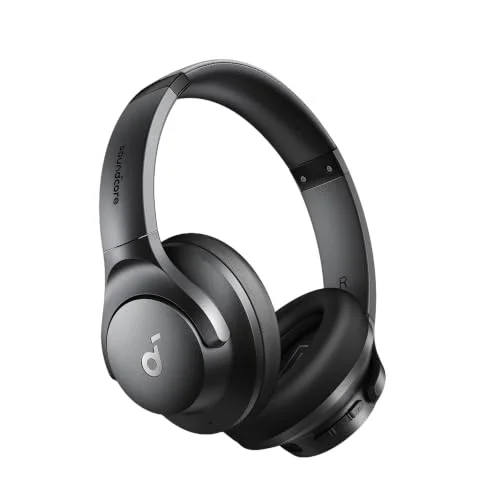
soundcore by Anker Q20i Hybrid Active Noise Cancelling Headphones, Black | Over-Ear, Bluet |

Deep over-ear cups and adjustable ANC give a hearing aid room while taming background noise.
The soundcore Q20i is an over-ear Bluetooth headphone with hybrid active noise cancelling and 40mm drivers. Its cups are roomy enough that a behind-the-ear aid can sit underneath without being crushed. The 40-hour ANC battery life means you can wear it through a workday or a long flight without recharging.
Transparency mode is the useful part for hearing-aid users: it pipes outside sound in, so you can keep the headphones on and still hear a conversation or a announcement.
The main limitation is clamping force. Some users with larger aids may still feel pressure after a couple of hours, so a break every 60 to 90 minutes helps. The dual-connection feature is handy if you pair the headphones with a phone and a laptop at once.
For the price, it is one of the more flexible options for someone who wants noise cancelling and a hearing aid in the same setup.
|
2
|
BERIBES Bluetooth Headphones Over Ear Wireless HiFi Stereo Headsets 65H 6EQ | Bluetooth 6. |
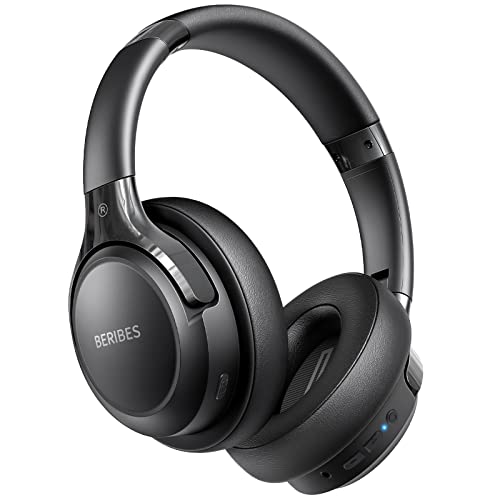
At 0.38 pounds it is light enough to reduce pressure on a hearing aid during long wear.
The BERIBES over-ear headphone weighs 0. 38 pounds and uses memory protein earmuffs, which matters when a hearing aid is already taking up space in your ear. The lightweight build means less downward pressure on the top of the ear, where a behind-the-ear aid sits.
Its 65-hour battery and 6 EQ modes let you tune the sound without reaching for a separate amplifier. Bluetooth 6. 0 pairs quickly, and the included 3. 5mm cable gives you a wired fallback when the battery runs out.
The trade-off is that it lacks active noise cancelling, so it will not mask loud environments the way the soundcore does. The cups are comfortable but not especially deep, so users with larger behind-the-ear aids should test the fit before committing.
It is a strong pick for people who prioritize low weight and long battery life over noise isolation.
|
3
|
SIMOLIO Bluetooth Compatible Wireless TV Headphones for Seniors SM-825D Pro | Boosted voic |
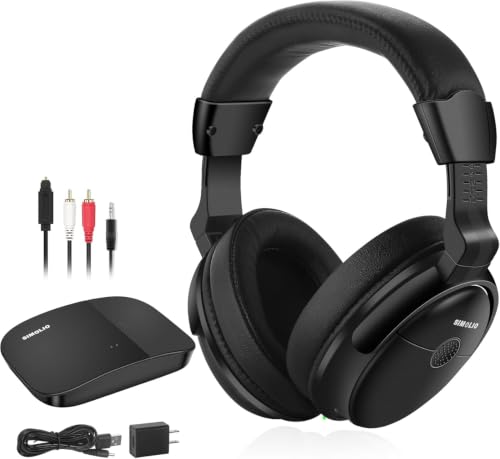
Voice clarity and left-right balance controls target the exact struggles hearing-aid users have with TV audio.
The SIMOLIO SM-825D Pro is a wireless TV headphone designed for seniors and the hard of hearing. It boosts dialogue above background music and offers three tone presets plus a left-right balance control, which helps if your hearing loss is not symmetrical. The 2.
4GHz transmitter connects to a TV without pairing and avoids lip-sync delay. A bypass mode lets the headphones work alongside a soundbar so family members can listen at their own volume.
This is not a general-purpose music headphone. It is built for home TV listening, and the dual-battery charging base reflects that. If you want something for commuting or phone calls, look elsewhere.
But for someone who wears a hearing aid and struggles with TV dialogue, the combination of clarity processing and balance control is hard to match at this price.
|
4
|
Starkey Comfort Buds – Check Description for Hearing Aid Compatibility (Open, 7mm) |

These open silicone buds are made to fit Starkey receivers, so they improve comfort under headphones.
The Starkey Comfort Buds are replacement earbud tips for Starkey hearing aids using SnapFit and SnapFit 2. 0 receiver wires. They are not headphones themselves, but they solve a related problem: a comfortable, secure seal makes the hearing aid less likely to shift when you put over-ear headphones on top.
The soft silicone conforms to the ear canal and comes in a 7mm open style that lets some ambient sound through.
The open design means less occlusion and less of your own voice sounding hollow, but it also provides less noise isolation. If you need maximum blocking for headphone listening, a closed dome may suit you better.
These are a maintenance item rather than a listening device, so buy them if your current Starkey domes are worn and causing the aid to sit unevenly.
|
5
|
Hearing Aid Cleaning Kit for Oticon/Phonak/Starkey, Pocket Size Tools |
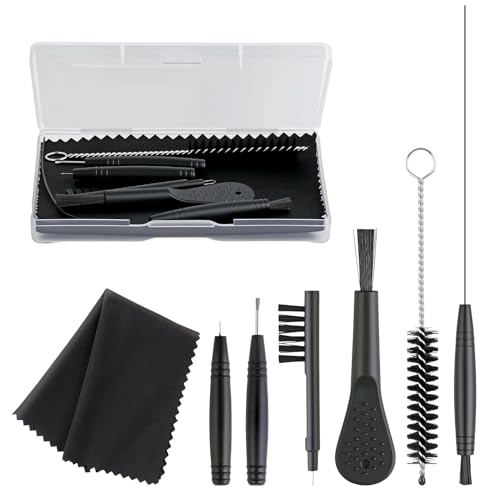
A clean hearing aid performs better under headphones, and this kit keeps wax and debris out.
This pocket-size cleaning kit includes a steel pick, vent cleaner, screwdriver, brush, vent brush tube tool, and microfiber cloth in a compact case. It works with Oticon, Phonak, and Starkey aids. The magnet on the brush head helps remove and insert batteries and adjust volume.
If you wear headphones over a hearing aid, earwax buildup in the receiver or vent can cause muffled sound or feedback, and this kit addresses that directly.
It is not a listening product, so do not expect it to change how headphones sound on its own. The value is preventive: regular cleaning keeps the aid’s microphone and receiver clear, which reduces the chance of whistling when a headphone cup sits nearby.
The tools are small, so keep the case in a consistent spot to avoid losing the pick or brush.
|
6
|
9mm Starkey Comfort Closed/Occluded Ear Buds for Starkey Hearing Aids (10 Pack) |

Closed domes block more outside noise, which pairs well with over-ear headphones for listening.
These 9mm Starkey Comfort closed ear buds come in a 10-pack and are designed for Starkey hearing aids. The closed or occluded design blocks more background noise than open domes, which can help when you are wearing over-ear headphones and want to reduce competing sound.
The soft silicone material is meant for all-day wear, and the green color keeps them discreet.
The closed design increases occlusion, so your own voice may sound louder or boomier. Some users find that uncomfortable for conversation but acceptable for music or TV. If you are switching from open domes, give yourself a few days to adjust.
The 10-pack is convenient for people who replace domes often or want a spare set in a bag.
The right choice depends on whether you need noise cancelling, TV dialogue clarity, or just a comfortable fit around your existing aid. The soundcore Q20i and BERIBES cover general listening, while the SIMOLIO targets TV.
The Starkey domes and cleaning kit are supporting items that keep the aid itself working well under headphones.
Settings and Habits That Make It Work
Once you have headphones that fit, the next step is adjusting how you use them with your hearing aid. A few settings and habits prevent most of the common problems.
Put your hearing aid in first and make sure it is seated comfortably.
Lower the aid volume slightly using its remote or app before putting headphones on.
Place the headphones over your ears slowly, letting the cups settle around the aid rather than pressing it.
Start headphone volume low, then raise it until the sound is clear without whistling.
If feedback starts, lift the cup away from the ear, reduce headphone volume, and try again.
After listening, remove headphones before removing the aid to avoid pulling the receiver.
Many modern hearing aids have a dedicated music or streaming program that changes how the microphones behave. Switching to that program can reduce feedback because the aid is less sensitive to the sound coming from the headphone driver.
If your aid supports Bluetooth streaming directly, you may not need headphones at all for phone calls or music. But for TV, airplanes, or shared spaces, over-ear headphones still offer a simple solution.
The key is to treat the headphone and the aid as two devices that need to cooperate, not compete. A little volume discipline goes a long way.
- Keep headphone volume moderate; loud output is the fastest route to whistling.
- Clean your hearing aid domes and vents weekly to prevent wax-related feedback.
- Avoid pressing the headphone cup against the ear with your hand.
- Take a five-minute break every hour to let your ear and aid rest.
- Store headphones with the cups open so they do not develop a permanent clamp.
- If feedback persists, ask your audiologist to adjust the aid’s feedback manager.
When Headphones Are the Wrong Answer
Headphones are not always the best route. For some hearing-aid users, a different approach solves the problem more cleanly and with less fiddling.
If your hearing aid supports direct Bluetooth streaming, you can send audio from your phone, TV, or computer straight to the aid without any headphones. That eliminates the fit and feedback problem entirely.
For TV, a dedicated streamer that plugs into the TV and transmits to your aid is often more comfortable than wearing headphones for hours. Bone conduction headphones are another alternative because they leave the ear canal open, so the hearing aid can stay in place.
The trade-off is less bass and a need for careful placement. Finally, if you only need occasional listening, a simple neck loop with a telecoil-equipped aid can work in public venues that support hearing loops.
Alternative Approaches Compared
| Approach | Best For | Main Drawback |
|---|---|---|
| Direct aid streaming | Phone calls, music | Requires compatible aid |
| TV streamer | Home TV watching | Extra device to charge |
| Bone conduction | Outdoor, awareness | Weaker bass |
| Neck loop / telecoil | Public venues | Limited availability |
| Remove aid + headphones | Critical music listening | Lose amplification |
What to Ask About
Bring your headphones to your next appointment if possible. Your audiologist can check whether the aid’s feedback manager needs adjusting for headphone use. They can also tell you whether your aid has a music program or telecoil, and how to switch to it.
If you are considering a new aid, mention that you use headphones regularly, because some models handle over-ear wear better than others. A five-minute adjustment at the clinic can save months of frustration at home.
Signs You Need a Different Setup
If you constantly fight feedback, develop sore spots on your ear, or find yourself removing the aid to use headphones, the current combination is not working. That is a signal to try a different headphone style, a different dome, or a streaming accessory.
Do not assume that discomfort is something you have to tolerate. Persistent pain or recurring feedback usually means the fit or the settings need attention, not that you should give up on headphones entirely.
Keeping the Pair Working Over Time
A setup that works today can degrade as domes wear out, pads flatten, and batteries age. A little maintenance keeps the headphone-and-aid combination comfortable for the long run.
Hearing aid domes lose their shape after a few months, and that changes how the aid sits under a headphone cup. Replace domes on the schedule your audiologist recommends, or sooner if they feel loose.
Headphone ear pads also compress over time, which increases clamping pressure and can push the aid into your ear. If your headphones start feeling tighter than they used to, new pads are often cheaper than new headphones. Battery performance in both devices declines gradually, so charge habits matter.
Keep the aid dry and the headphones clean, and the combination will stay reliable.
- Replace hearing aid domes every two to three months or when they feel loose.
- Wipe headphone ear pads monthly with a dry cloth to remove oils.
- Check the headband adjustment periodically; it can slip with daily use.
- Store the aid in a dry box overnight to reduce moisture damage.
- Replace compressed headphone pads when clamping pressure increases noticeably.
- Revisit your audiologist if feedback returns after months of quiet use.
Yes, you can wear headphones with a hearing aid, but the fit and the settings decide whether it works well. The practical next step is to try an over-ear headphone with a deep cup, lower your aid volume slightly, and listen for feedback before turning the music up.
If whistling starts, lift the cup and adjust rather than pressing harder. If it still fights you, a quick visit to your audiologist to check the feedback manager is worth more than any new pair of headphones.

Leave a Reply