
When you split one headphone jack into two, a drop in volume is a real concern. The instinct is to worry that each listener is getting half the sound, or that the signal somehow gets lost.
That worry shows up whenever you’re sharing a movie on a flight or handing your phone to a friend. A passive splitter genuinely splits the electrical signal between two outputs, so the maximum volume can come down a little. In practice, most phones and laptops have enough headroom to cope.
The bigger thing to think about is impedance matching, not just loudness. Understanding how these adapters behave makes choosing easier. Some models add active controls to balance levels, while others keep transmission purely passive.
I’ll walk through the question of whether the drop is noticeable, then look at specific tools that handle it well.
Why Splitting Audio Affects Levels
When a second pair of headphones is plugged into the same jack, the electrical load changes, and that’s where the “splitter = quieter” idea comes from. Let me walk through the physics quickly. It helps explain why some listeners notice a drop while others don’t.
The headphone jack puts out a certain voltage. With one pair of headphones connected, the amp only drives that one load. Add another pair, and you’ve put the two in a parallel circuit, which drops the total impedance. Now the source has to supply more current to both drivers.
If the amplifier doesn’t have enough power in reserve, you’ll hear a lower volume. That’s the loading effect, not a flaw. Many phones and laptops have decent amps and can handle dual headphones without serious loss. Older or lower-powered devices may struggle.
Since a passive splitter has no power of its own, it can only divide up what’s already there, so some reduction is normal. High-impedance headphones make the effect more obvious, while low-impedance models tend to hold up better.
Just go in with that expectation: a slight drop is likely, but it’s rarely enough to ruin a shared listening session.
Passive vs Active Splitting Effects
| Feature | Passive Splitter | Active Splitter |
|---|---|---|
| Power Source | None required | Needs battery or USB |
| Volume Level | Slightly reduced | Maintained or boosted |
| Signal Quality | Depends on source | Consistent output |
| Cost | Low | Higher |
How Controls Mitigate Signal Loss
Not every splitter is just a passive Y cable. Quite a few include built-in volume knobs. These are useful because they let each person adjust the level independently, and they can help compensate for any drop caused by splitting. Here’s what those controls do.
Top Splitters To Maintain Audio Levels
Choosing the right adapter matters if you care about keeping volume intact. I looked at ten options with different strengths: some give you independent volume controls, others focus on preserving signal quality through materials and shielding. They all address the main concern of volume reduction in their own way.
Think about the source device you’ll be using and whether you and the other listener need separate level control. The reviews below point out how each model handles that balance.
|
1
|
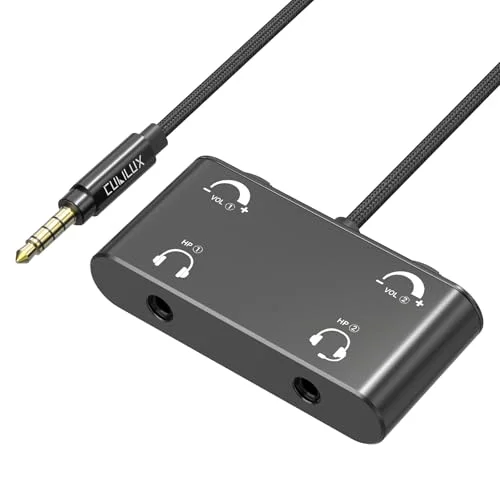
Cubilux Headphone Splitter with Volume Control, 3.5mm Dual Earphones Connector, 1/8 Double |

The independent volume knobs let you turn the phone’s output up to maximum, then attenuate each side to personal taste, which compensates for the natural signal split.
Cubilux’s splitter has two volume controls, and that simple feature makes the volume-drop issue much easier to manage. You can crank the source device and then use each knob to set a comfortable level per listener.
The gold-plated plug and oxygen-free copper wire are there to keep the signal clean, and the aluminum case gives it a more robust feel than a basic plastic Y cable. Nylon braiding helps with tangles, and the microphone input support means it can double for hands-free calls or gaming chats.
The short cable works well for travel, tossing it in a bag before a plane ride is easy.
This splitter works well with most phones I would normally use. The knobs turn smoothly and give you real control, so one person can have a higher volume while the other listens at a lower level. That adjustment range is rare on basic splitters.
A quick check on compatibility is worth it before buying, since the microphone routing won’t work with every device. The build feels durable and the short cable keeps it neat. If you’re tired of fighting over volume during shared listening, this is a practical fix.
|
2
|
Besmelody 3.5mm Y Splitter Cable with Volume Control, 3.5mm Headphone/Headset Splitter Mal |

Separate volume dials let each user crank the source to max and then trim their own side, making the split less of an issue.
Besmelody’s Y splitter gives you two independent volume dials, which is exactly what you want when one person prefers things louder. The corrosion-resistant connectors keep contact stable, and the cable carries stereo audio to both outputs without obvious signal loss.
It’s a straightforward design, works with iPhones, Android phones, and tablets, and the money-back guarantee is a nice sign of confidence. If you mostly share music on the couch, this one is easy to recommend.
There’s no need to fuss with installation, plug it in and it works. The volume knobs feel solid and are easy to identify by touch. Sound stays clean, with no extra hiss or static that you sometimes get with cheap splitters.
Cable length is about right for two people sitting close, though it won’t reach behind a couch. What it doesn’t do is pass through a microphone, so for gaming or calls, you’d need another solution. For music and movie sharing, the price is fair and the controls are genuinely useful.
|
3
|
SYNCWIRE Headphone Splitter, 3.5mm Nylon-Braided Male to 2 Female Y Cable | Extension Cabl |

Gold-plated connectors and double shielding keep signal loss and noise low, which helps limit the volume drop you get with passive splitting.
SYNCWIRE’s splitter is aimed at people who care about sound quality. A 24K gold-plated connector and double shielding are the main talking points here, and they do reduce interference and signal loss. The metal housing feels sturdier than typical plastic, and the nylon braid keeps it from tangling.
Compatibility is broad, phones, tablets, laptops, handheld consoles, so it’s a safe carry for travel. There’s no microphone support, so it’s purely for output. If build quality matters as much as function, this one gets attention.
I would shortlist this if your priority is keeping the audio signal as intact as possible. Listeners usually notice clear highs and solid bass with this cable. The braided exterior looks tidy, and the connectors seat firmly in the jack.
The absence of volume knobs is the trade-off, both listeners hear the same level, and the device volume controls everything. That’s fine for some people, frustrating for others. As a passive cable, it does a good job at preserving volume and detail. Just know you’re buying signal integrity, not individual control.
|
4
|
QIEIEI Headphone Splitter 3.5Mm Male to Double Female Headphone Headset Y Splitter Cable w |

Dual volume switches allow each listener to set their own level, which helps offset the loss when splitting a single output.
QIEIEI’s splitter has two independent volume switches, so you aren’t stuck with one shared level. That’s a useful feature when one person is hard of hearing or prefers bass-heavy content at higher levels. It works with a PC, phone, or any device with a 3.
5mm output, and the compact black design blends into a desk setup well. The switches are easy to reach, and the cable keeps things tidy. It’s a straight solution for shared listening.
The splitter is simple to use, and the volume switches give you tangible control rather than just “one output. ” I’d see this as a budget-friendly choice for casual listening. The plastic housing isn’t as premium as metal options, and the cable is short, but that’s fine on a desk.
Audio quality is decent, not audiophile-level, but perfectly acceptable for video calls or YouTube sharing. The independent volume controls make it easy to match levels between two people.
|
5
|
Conwork 2-Pack 3.5mm Stereo Male to Dual Female Audio Headphone/Headset Y Splitter Cable w |

With two separate volume dials per splitter, you can keep the source signal at maximum and lower only what each person needs, which minimizes the perceived drop.
Conwork’s set gets you two 3. 5mm splitter cables, each with independent volume dials. That’s a smart buy if you want one at home and one in your bag. It splits a single 3.
5mm output into two duplicated signals, and the dials let you adjust each pair of headphones separately. The cable is short at 20cm, intended for close sharing, and the lifetime warranty is a nice peace-of-mind perk. For the price, it’s an economical way to add volume-controlled splitting.
This is one of those purchases where having a spare saves you later. The dials work smoothly and do what they’re supposed to: balance audio between two listeners. Sound is clean and free from static, and the cables are flexible enough to route around a phone.
The plastic build feels a little light, but normal use shouldn’t be a problem. If you’re outfitting a family or classroom, the 2-pack price is hard to argue with. Just keep expectations in check, this is a functional budget solution rather than a premium cable.
|
6
|
3.5mm Audio Switch with line Volume Controller, 3 in 1 Out 1/8″ aux switcher Splitter sele |
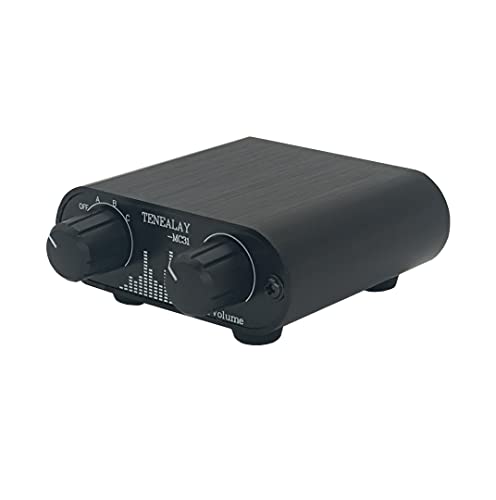
The inline attenuator lets you push the source to full volume and then reduce the signal precisely, giving you clean level control after the split.
This isn’t just a splitter, it also has a 3-in-1 input switch and a volume knob. The aluminum CNC case feels solid, and the knob turns with a smooth, precise motion. You can plug three sources into one output and switch between them, which is handy for a desktop setup.
It doesn’t amplify; it only attenuates, so you’re managing volume rather than boosting a weak signal. The metal body also acts as a shield against interference, which helps with cleaner audio.
The switch is the standout feature here. Instead of swapping cables you just twist the knob to change input, and then set the volume to your preferred level. The knob is smooth with no scratching noise as you turn it.
It’s bulkier than a basic splitter, so it’s not something I’d want in a pocket, but it’s perfect for a desk or nightstand. Since there’s no amplification, your source still matters, but the control this gives you is valuable.
People with multiple devices will get more use from it than someone sharing headphones on a bus.
|
7
|
5-Jack Multi-Headphone Audio Splitter Injection Molding – Designed for Up to 5 Devices |

With five outputs, each port gets a smaller slice of the signal, so the drop is more noticeable here; the solid build at least avoids extra signal loss on top of that.
This one splits a single 3. 5mm jack into five outputs, which makes it a group-listening tool rather than a two-person accessory. The injection-molded body and gold-plated connectors are meant to keep the signal steady across all ports.
Because the power is divided five ways, you definitely need a phone or laptop with a strong amp, otherwise it can sound quiet. The compact size makes it easy to bring along on a trip, and the wide compatibility is a plus.
For classrooms or small groups, it’s an interesting option.
The novelty of sharing audio with five people is genuinely fun, but the volume trade-off is real. With a decent source it works fine; with a weaker one, you’ll find yourself turning the volume to max.
There are no individual volume controls, so everyone hears the same level, which can cause compromise. Build quality seems sturdy enough for regular plugging and unplugging. I’d use this in a pinch, but not as my daily splitter.
For a small group road trip or a group video session, it’s a neat gadget.
|
8
|
D & K Exclusives Headphone Splitter For Computer 3.5mm Female to 2 Dual 3.5mm Male Headpho |
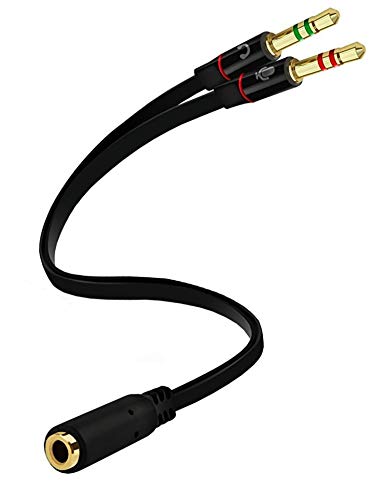
Gold-plated connectors and oxygen-free copper keep the contact as clean as possible, so the passive split doesn’t add any more loss than necessary.
D & K Exclusives makes a splitter specifically for combining a modern headset’s audio and microphone signals into the separate jacks on a PC. It solves the common problem where a laptop has two ports but the headset only has one 3. 5mm plug.
The gold-plated connectors and oxygen-free copper are there to keep conductivity high, and the compact build slips into a laptop bag easily. It supports VOIP calls and chat programs. It’s not the same as a stereo splitter for two headphones, so don’t buy it for that.
This little adapter is a lifesaver if you work from home and use a newer headset on a desktop. Audio quality during calls stays clear, while the dual male plugs fit into the standard PC jacks.
There are no volume controls here, so your PC settings are the only thing managing levels. It’s a simple, well-built cable for a specific job.
It won’t help you share music with a friend, but if you need to connect a headset with a combo jack to a computer, I would start here.
|
9
|
Cubilux 3.5mm Stereo Volume Controller, Headphones Volume Attenuator with Full Aluminum Al |

As a dedicated attenuator, it lets you drive the source hard to overcome split losses, then precisely dial back the volume to safe levels.
Cubilux sells a separate inline volume controller alongside its splitters. This isn’t a Y cable; it’s just a volume knob that sits between your source and your headphones. You can use it with any audio device, and the aluminum alloy shell helps block interference.
The knob is stepless, so you can find the exact level you like. It doesn’t amplify, it only lowers the signal, so you start from the source’s max volume and dial down to whatever you want. That kind of control is handy when your phone’s volume steps are too coarse.
An inline attenuator sounds simple, but it gives you much finer control than the volume buttons on your device. It pairs well with a passive splitter: push the device volume high, then use this controller to bring the level down precisely.
The build quality is solid, and the mute function works by turning the knob all the way down. It does add a small box to your cable setup, so it’s not as neat as a plain cable. But for someone who is particular about listening levels, it’s a useful companion.
|
10
|
UGREEN Headphone Splitter 3.5mm Audio Y Cable Male to Dual Female Adapter | For Music Shar |

Premium materials like aluminum and gold plating minimize resistance, helping maintain higher volume levels despite the passive split.
UGREEN’s Hi-Fi splitter is a straightforward passive Y splitter, with a twist: it uses an aluminum alloy shell and 24K gold-plated connectors, along with oxygen-free copper wiring. Those materials keep resistance and signal loss down, which helps the volume drop feel less dramatic.
The strain-relief rings and flexible TPE outer layer make it durable enough for regular use. At about 7. 87 inches, it’s short and compact, so it’s easy to pack. No microphone support, but for pure audio output it’s built well.
Sound quality is the main reason to consider this UGREEN cable. The connection feels tight, the aluminum housing adds strength, and the signal stays clean. Both listeners get the same level because there are no volume knobs, so if that matters you’ll need to look elsewhere.
The short length is great for keeping things close, but limits how far apart two people can sit. If you want a solid passive splitter that doesn’t introduce extra noise, this is a safe call.
These splitters offer different ways to handle the volume drop. Models with volume controls give you flexibility for two listeners with different preferences. High-quality passive cables keep the signal intact without adding extra controls. Choose based on whether you want independent adjustment or a simpler cable.
All of these options make the natural drop from splitting less annoying. Consider what device you’ll be plugging into and where you’ll use it. The right pick balances volume, quality, and convenience for your particular setup.
Maximizing Volume On Shared Devices
Even with a good splitter, source power matters. Here are some tips for getting the loudest clean sound. A few small adjustments to device settings and hardware can make a real difference.
- Maximize your device volume before splitting the signal to ensure strong output.
- Use low-impedance headphones to reduce the power load on your audio source.
- Clean your headphone jacks regularly to prevent resistance from dirt buildup.
- Avoid using long extension cables which can further degrade signal strength.
- Check for equalizer settings that might be lowering overall output gain.
Device limitations play a huge role. Smartphones vary in amplifier power. Older phones may struggle with dual loads. Newer flagships often have stronger DACs. If volume is low, try a different device. Tablets usually have more power than phones. Laptops are also strong sources. Avoid using cheap dongles.
They add resistance and reduce volume. Stick to direct connections when possible. If you must use a dongle, choose a high-quality one. Digital-to-analog converters matter. A good DAC provides cleaner power. This results in louder and clearer sound. Software settings can also help. Disable any volume limiters in your OS.
Some phones have safety features. These cap maximum volume. Turn them off if safe to do so. This unlocks full potential. Remember that hearing health is important. Do not blast volume for long periods. Take breaks to protect your ears.
Troubleshooting Common Audio Issues
If the volume is suddenly much lower than expected, the problem might not be the splitter itself. This section walks through the usual culprits and what to check.
Test each headphone individually to rule out faulty drivers or cables.
Inspect the splitter jack for bent pins or debris blocking connection.
Try a different audio source to isolate if the problem is the device.
Wiggle the connector gently to check for loose internal wiring contacts.
Loose connections are common culprits. Ensure plugs are fully inserted. Sometimes cases block full insertion. Remove your phone case if needed. Check for lint in the port. Use a wooden toothpick to clean it. Metal tools can damage pins. Be gentle and careful.
If one side is quiet, the splitter may be defective. Internal wires can break from bending. Test with known working headphones. If both are quiet, the source is likely the issue. Check your balance settings. Ensure audio is not panned to one side. Reset your audio drivers on PCs.
This fixes software glitches. Update your firmware if applicable. Hardware failure is rare but possible. If all else fails, replace the splitter. Cheap ones fail often. Invest in a durable model. It saves trouble in the long run. Proper care extends lifespan significantly.
So, does a headphone splitter reduce volume? Yes, splitting the signal means each output gets a smaller share of the power, so there is usually a drop. But with a decent splitter and a reasonably powerful source, it’s not the kind of drop that ruins the music.
The most practical fix is to turn the phone or laptop up to full volume, then use a splitter with independent volume controls to balance the two sides. Low-impedance headphones also help. Before you buy anything, try your current setup with these adjustments.
A lot of people find they can get acceptable levels with gear they already own. If not, look for a controlled splitter that can attenuate each channel independently. The main thing is avoiding the cheap passive cables that add noise and lose signal.
With the right choice, you can share audio without constantly turning things up.

Leave a Reply