
There’s nothing worse than reaching for your headphones right before a commute or workout, only to find the battery dead. Most Beats models rely on standard Micro-USB ports, which is good news, you likely already have a compatible cable lying around.
That said, grabbing the wrong cord isn’t just an inconvenience; it can fail to charge your device or, in worst cases, damage the battery. Newer models are shifting to USB-C, but plenty of older gear still sticks to Micro-USB.
This guide breaks down exactly what you need to know to avoid those mismatches and highlights reliable cables that deliver safe, efficient power for your specific setup.
Identifying Your Beats Charging Port
Before you plug anything in, take a second to identify the port on your headphones. Forcing the wrong connector is a quick way to cause physical damage. Here’s how to tell the difference between Micro-USB and USB-C inputs so you don’t make that mistake.
Micro-USB Characteristics
If you’re rocking older Beats models like the Solo 2 or Studio 2, you’re dealing with Micro-USB. You’ll spot this port by its trapezoidal shape with tiny hooks on one side, it only fits one way. Trying to force it upside down is a surefire way to break the internal pins.
These ports were standard on devices made before 2018 and generally support slower charging speeds than modern standards. If you’re unsure about your model year, I’d recommend checking the manual first.
USB-C Advantages
Newer Beats products have moved to USB-C ports. This oval-shaped connector is reversible, so you can plug it in either way without fumbling. It supports faster charging and higher data transfer rates, matching the standard found on most modern Android phones and laptops.
If your headphones have a symmetrical oval port, you definitely need a USB-C cable. Do not try to force a Micro-USB plug into a USB-C slot; that mismatch can cause permanent hardware failure and void your warranty instantly.
Common Beats Models and Ports
| Model Series | Port Type | Cable Needed |
|---|---|---|
| Solo 2 / Studio 2 | Micro-USB | Standard Micro |
| Solo 3 / Studio 3 | Micro-USB | Standard Micro |
| Powerbeats 3 | Micro-USB | Standard Micro |
| Beats Fit Pro | USB-C | USB-C Cable |
Reliable Cables for Charging Beats
Once you’ve confirmed your port type, picking a high-quality cable is the next step to ensure longevity. Cheap cords tend to fray quickly or deliver inconsistent power, which isn’t worth the risk. The following options provide safe, efficient charging for various headphone models, prioritizing durability and compatibility with Beats devices.
|
1
|
Replacement Bose SoundLink Color Bluetooth Speakers I II III 3 Micro USB Wall Charger Char |

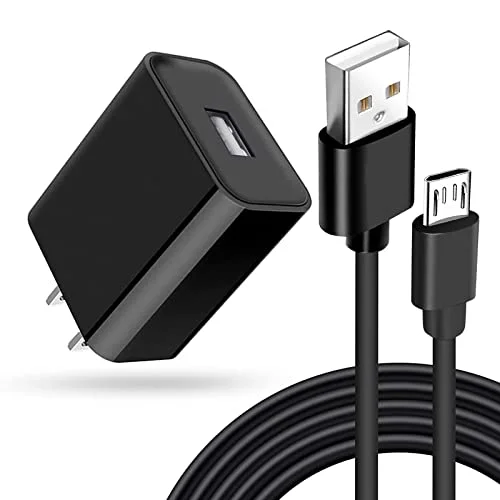
This Micro-USB cable is a solid match for older Beats models that require standard micro connectors for reliable power delivery.
This replacement charger features a standard USB-A to Micro-USB design, fitting many legacy audio devices including older Beats headphones. The construction ensures stable power transfer during charging cycles, and users report consistent performance with various Bluetooth speakers and headsets.
It’s a practical solution if you’ve lost or damaged your original cord. Just double-check that your device uses Micro-USB before buying, as this won’t work with USB-C ports.
I’d keep this cord handy for home or office use where reliability matters more than speed. It handles regular plugging and unplugging without immediate fraying, though it lacks the fast-charging capabilities of newer standards.
It serves well as a backup for older gear, but don’t try using it with modern USB-C devices. The length is sufficient for most desk setups, offering a straightforward, no-frills charging experience for legacy Beats users.
|
2
|
JMDDS USB Charger Charging Cable Cord [Micro-USB] Fast Charge for Wireless Bluetooth Speak |

JMDDS offers fast charging up to 10W, ensuring quick power restoration for compatible Beats headphones while maintaining safety.
The JMDDS USB charger supports fast sync and charge capabilities up to 10W, working with 5V/2A outputs to suit many Beats models. The flame-retardant exterior adds a layer of safety against overheating, while built-in safeguards protect against overcharging and short circuits.
Designed for wireless Bluetooth headphones and speakers, it ensures your device receives adequate power without risking battery health during extended sessions.
This option stands out for users who prioritize both speed and safety. The 365-day after-sales guarantee provides some peace of mind, and the cable fits securely into Micro-USB ports without wobbling.
Note that it may not support proprietary fast-charging protocols for every device, so pairing it with a compatible wall adapter yields the best results. The durable build quality makes it a solid everyday choice for keeping your audio gear powered up.
|
3
|
QC35 Charging Cable Compatible with Bose QuietComfort 35, QC35 II, QC25, QC20, QC20i & Sou |

This short 25cm cable is perfect for portable charging, slipping easily into bags for on-the-go Beats power needs.
At just 25cm, this Micro-USB cable is designed for portability and quick connections. It supports currents up to 3A, allowing for rapid charging of compatible Beats headphones. The thickened PVC material resists bending and breaking over time, and it undergoes rigorous testing to ensure electronic safety certification compliance.
Its compact size makes it easy to toss into pockets or small bags, connecting securely to power banks or laptop USB ports while traveling.
I’d recommend this for travelers who need a lightweight charging solution. The short length significantly reduces tangling in bags, though it does limit mobility since you need to stay close to the power source.
The advanced welding technology helps prevent metal part breakage, making it a robust option for daily commutes. Just ensure your Beats model accepts Micro-USB input before use; this cable excels in convenience and durability for active lifestyles.
|
4
|
USB C to 3.5mm Headphone and Charger Adapter,2 in-1 USB C PD 3.0 Charging Port to Aux Audi |
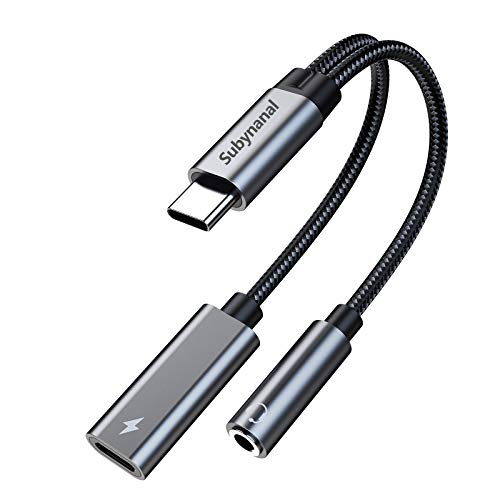
This adapter allows simultaneous audio listening and charging via USB-C, which is useful for newer Beats setups with auxiliary inputs.
This 2-in-1 USB-C adapter combines audio output and charging capabilities, supporting PD 3. 0 fast charging up to 60W. While primarily designed for phones, it can charge USB-C equipped Beats headphones while passing audio through. The compact 13cm design is highly portable, supporting high-resolution audio playback up to 32bit/384Khz.
With plug-and-play functionality requiring no drivers, it’s a versatile tool for users who want to listen and charge at the same time.
This is best suited for modern devices with USB-C ports, effectively eliminating the need for separate dongles.
Keep in mind that it does not support data transfer functions, and some newer phones may not support QC charging with this adapter, so using a PD wall charger is recommended for optimal speed.
It’s a niche solution for specific use cases involving wired listening and charging, so verify compatibility with your specific headphone jack requirements before purchasing.
|
5
|
(2-Pack) Charging Cable for Shokz Aeropex/OpenRun, OpenRun Pro, OpenRun Mini & OpenComm 2/ |

This magnetic cable is designed for Shokz but illustrates specialized charging needs, distinguishing them from standard Beats Micro-USB ports.
This 2-pack magnetic charging cable is specifically engineered for Shokz Aeropex and OpenRun models, featuring a 3. 3-foot length for flexible placement near power sources. The dense, smooth construction ensures durability and ease of use.
While it isn’t compatible with standard Beats Micro-USB ports, it highlights the importance of model-specific chargers. The magnetic connection simplifies the process for bone conduction headphones and includes comprehensive safety systems for device protection.
Beats owners should note that this product serves Shokz users exclusively. It demonstrates how specialized headphones often require unique charging solutions. The extra-long cord offers convenience for desktop setups, and if you own Shokz devices alongside Beats, this is a valuable addition.
However, do not attempt to adapt it for Beats headphones; sticking to standard Micro-USB or USB-C cables for your Beats gear is the only way to avoid damage.
|
6
|
USB Charger Charging Cable Cord Compatible with for Beats by Dr Dre Studio Solo 3 2 2.0 Po |

Specifically compatible with Beats Solo and Studio series, this cable ensures safe, fast charging tailored for your headphones.
This USB charger is explicitly compatible with Beats Solo 2, 3, Studio 2, 3, and Powerbeats, supporting quick charging up to 10W via 5V/2A output. The flame-retardant shell protects against overheating and short circuits, while data transfer speeds reach 480Mbps for firmware updates if needed.
The black design matches most Beats aesthetics, serving as a direct replacement for lost original cables with build quality that ensures long-term reliability for daily routines.
This is a top pick for Beats owners seeking a dedicated, reliable cable. The 365-day guarantee adds value, and the cable charges up to twice as fast as ordinary cables in some tests. To get maximum speed, ensure your wall adapter supports 2A output.
The cable is sturdy and resists fraying at the connectors, making it a confident choice for maintaining battery health in popular Beats models and their wireless speakers.
These cables offer reliable charging solutions for various Beats models, so your choice really depends on your specific port type and usage habits. Durability and safety features are key considerations for long-term battery health.
I’d suggest selecting the option that best fits your lifestyle and device compatibility to keep your headphones running smoothly.
Safe Charging Practices for Longevity
Developing proper charging habits can significantly extend the life of your headphones’ battery. Avoiding common mistakes helps prevent premature degradation, so following these guidelines will help maintain optimal performance over time.
- Use only certified cables and adapters for your specific Beats model.
- Avoid charging in extreme temperatures to prevent battery swelling.
- Unplug once fully charged to reduce stress on the battery cells.
- Do not force connectors into ports; check orientation before inserting.
- Keep charging ports clean from dust and debris regularly.
Battery health declines naturally, but poor habits can accelerate this process. Using high-voltage adapters with low-power devices can cause overheating, so always match the charger output to your headphones’ requirements. Storing headphones in hot cars damages internal components, and you should regularly inspect cables for fraying or exposed wires.
Replace damaged cords immediately to prevent short circuits. These simple steps ensure your Beats headphones remain functional for years.
Troubleshooting Common Charging Issues
If your headphones refuse to charge, several factors could be at play. Identifying the root cause saves time and money, and this section covers typical problems and their solutions.
Check the cable for visible damage or fraying at the ends.
Try a different USB wall adapter to rule out power source issues.
Clean the charging port gently with compressed air or a soft brush.
Ensure the cable is fully inserted into the headphone port.
Restart your headphones to reset any software glitches preventing charging.
Sometimes the issue lies with the power source rather than the cable. Laptop USB ports may not provide enough amperage for fast charging, so using a dedicated wall adapter often yields better results. If none of these steps work, the battery itself may be faulty.
In that case, contact Beats support for warranty claims if your device is still covered. I’d avoid third-party repair shops that may void your warranty further.
Always charge your Beats headphones using the correct Micro-USB or USB-C cable for your specific model. Verify the port type before connecting to prevent any accidental damage. I’d start by checking your current cable for wear and tear today, and replace it if necessary to ensure consistent power delivery.

Leave a Reply