
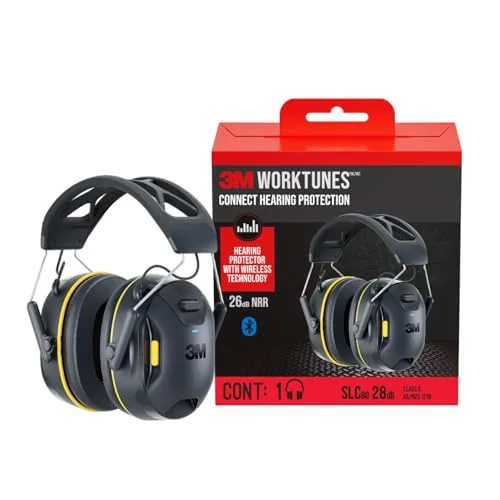
Getting your 3M WorkTunes headphones to pair over Bluetooth is usually a quick process, but the exact steps depend on which version you own.
Whether you are running a mower or working a loud job site, these protectors block out harmful noise while letting you stream music or take calls wirelessly. I wrote this breakdown to walk through the pairing basics and highlight how different models in the lineup handle that connection.
Once you know where the buttons are, staying entertained safely on the clock gets much easier.
Pairing Bluetooth Headphones On The Job
Bluetooth pairing is what lets these protectors double as wireless headphones. Instead of messing with cables near heavy machinery or yard equipment, you connect directly from your phone. Here is how that process generally plays out across the WorkTunes lineup.
Press the power button to turn on the headphones.
Activate pairing mode by holding the Bluetooth button until the light flashes.
Go to your device’s Bluetooth settings and select the headphones from the device list.
Wait for the connection to confirm and test with some audio.
Adjust volume and controls to ensure everything works as expected.
Benefits Of Wireless Pairing For Headphones
Going wireless means your hands stay free and your hearing stays protected. You can answer a call or skip a track without pulling off your muffs mid-task. My read is that this convenience is exactly why so many people rely on the WorkTunes series for daily work.
Without cables dragging around, you eliminate a real snag hazard on job sites. The freedom to move around while streaming audio or taking calls makes a noticeable difference, especially when you are operating equipment like mowers or power tools.
Picks To Pair WorkTunes Headphones
The models below cover the main ways 3M handles Bluetooth pairing across the WorkTunes range. Some stick to basic wireless streaming, while others add AM/FM radio or even solar charging into the mix.
I would shortlist based on where you actually work, if you are outdoors all day, the features you need will look very different from someone on a factory floor.
|
1
|
3M WorkTunes Connect Wireless Hearing Protector with Bluetooth | Bluetooth Technology Hear |

This base model uses straightforward Bluetooth pairing to connect your phone for safe listening on the job.
The 3M WorkTunes Connect Wireless Hearing Protector anchors the lineup with a 26 dB Noise Reduction Rating (NRR). Pairing happens over standard Bluetooth, letting you stream music or take calls without removing the muffs.
A built-in volume limiter keeps your audio at safe levels, and the high-fidelity speakers deliver clear sound once you establish that connection. It is designed to keep you focused and protected simultaneously.
I would point construction workers or shop mechanics toward this one if they just want reliable wireless audio. It holds up against water exposure, which matters when you are sweating or working outside. People who mow lawns frequently pick this up because it balances safety standards with entertainment.
Just keep an eye on the battery, you will need to plug it in eventually.
|
2
|
3M WorkTunes Connect + AM/FM Wireless Hearing Protector with Bluetooth | Bluetooth Hearing |

Pairing works the same way here, but you gain an AM/FM radio as a backup when you do not want to use Bluetooth.
If you want more than just Bluetooth streaming, the 3M WorkTunes Connect + AM/FM pairs wirelessly while also packing in a dedicated radio receiver. It carries the same 26 dB NRR, but adds three equalizer settings so you can tweak the audio profile after connecting.
The radio reception is surprisingly solid for a work environment. Like the standard model, it includes volume limiting and water resistance to survive tough conditions.
This fits users who prefer tuning into local stations during long shifts instead of draining their phone battery. You can still jump on a hands-free call via Bluetooth when needed. One thing I would check: radio signals can get spotty inside metal buildings, so test reception in your actual workspace.
Firmware updates occasionally improve performance, so make sure yours is current if you run into quirks.
|
3
|
3M WorkTunes Connect + Solar Wireless Hearing Protector with Bluetooth | Bluetooth Technol |

Once paired, the integrated solar cell keeps the headphones charged using ambient light, reducing downtime.
The 3M WorkTunes Connect + Solar takes the standard Bluetooth pairing process and adds a Powerfoyle Solar Cell to the headband. As long as there is indoor or outdoor light, it continuously tops off the battery while you stream music or take calls.
It maintains the 26 dB NRR and uses updated Bluetooth technology to sync with your devices. For anyone spending hours outside, this changes the charging routine entirely.
My read is that this model belongs on the heads of landscapers, farmers, or anyone doing extended yard work. The solar feature genuinely extends your listening time when the sun is out. However, I would be realistic about heavy overcast days, the charging slows down significantly without direct light.
Test how it handles your typical weather before relying on it for a full week away from a charger.
|
4
|
3M WorkTunes Connect Hearing Protector with Bluetooth Wireless Technology, 24 dB NRR, Hear |

Extended battery life means fewer interruptions to your workflow once you complete the initial Bluetooth pairing.
This version of the 3M WorkTunes Connect pairs easily over Bluetooth and stands out with 40+ hours of battery life on a single charge. It offers a 24 dB NRR and uses USB-C charging, which is far more convenient than older proprietary cables.
High-fidelity speakers handle the audio once you are connected. It targets professionals who cannot afford to stop and plug in halfway through a shift.
I would shortlist this for busy contractors who work long days and hate managing batteries. The water resistance holds up well in demanding environments. The obvious trade-off is that even 40 hours runs out eventually, so checking the battery indicator before a massive shift is still a smart habit.
Still, having that kind of runway makes daily use much less stressful.
|
5
|
3M WorkTunes Connect + AM/FM Hearing Protector with Bluetooth Technology, Ear protection f |
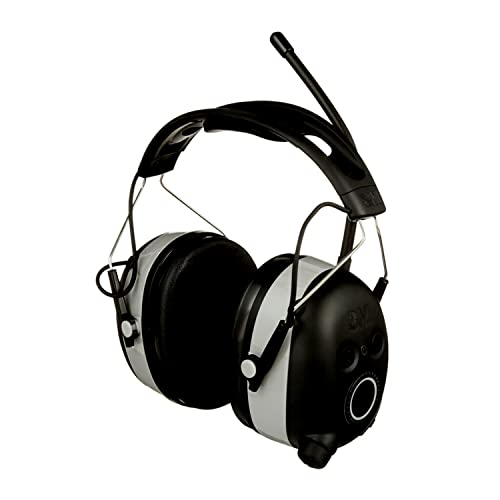
An audio assist feature talks you through the setup process, making the initial pairing less frustrating.
The 3M WorkTunes Connect + AM/FM Hearing Protector pairs via Bluetooth and brings a 24 dB NRR to the table.
What sets it apart is the audio assist function, it provides voice guidance during setup so you do not have to pull the muffs off to figure out what mode you are in.
An integrated microphone handles calls, and the AM/FM radio includes a bass boost option once everything is synced up.
This is a practical pick for people mowing large properties or working loud construction sites who need hands-free calling. The voice prompts save time when you are trying to switch between radio and Bluetooth. I would note that keeping the firmware updated helps prevent pairing glitches.
Check your audio settings before each major project to ensure the bass boost or EQ is dialed in correctly.
|
6
|
for 3M WorkTunes Replacement Ear Pads Headphones Connect Hearing Protection with Noise Can |

Fresh ear pads maintain the acoustic seal necessary for your paired headphones to perform as intended.
Replacement ear pads for 3M WorkTunes headphones are not electronic, but they matter immediately after you pair your device. If the foam is compressed or torn, your 26 dB NRR drops, and the audio quality suffers.
These pads are cut specifically for the Connect models, ensuring the Bluetooth audio sounds the way it should while maintaining proper hearing protection. Upgrading worn pads restores both comfort and isolation.
Workers wearing these muffs for eight-hour stretches will notice the difference a fresh set of pads makes. They improve the physical seal around your ears, which directly impacts how well the noise cancellation works alongside your streamed audio.
The only limitation is wear and tear, if you are in a harsh environment, expect to swap them out periodically rather than treating them as a permanent fix.
|
7
|
for 3M WorkTunes Replacement Ear Pads Headphones Connect Hearing Protection with Noise Can |

Buying replacement pads in bulk ensures your paired headphones stay comfortable through multiple projects.
Having a backup set of replacement ear pads means you never have to pause work because your current ones wore out. These fit the 3M WorkTunes Bluetooth models and restore the upgraded fit needed for effective noise cancellation.
If you lose or damage pads frequently on job sites, buying them in packs keeps your hearing protection, and your wireless audio experience, intact without delay.
I would recommend this approach for landscaping crews or construction teams going through gear quickly. Maintaining that physical seal is critical for the NRR rating to hold true while you listen to music or podcasts.
Just verify the fit snaps securely into place after installation, as loose pads will leak noise. Buying in twos simply makes the math easier for regular maintenance.
|
8
|
Silicone Gel for 3M WorkTunes Ear Pads Headphones Connect Hearing Protection with Noise Ca |

Adding silicone gel to your pads improves the physical seal after you have already paired and connected your device.
Silicone gel inserts for 3M WorkTunes ear pads act as a comfort upgrade once your headphones are paired and running. The gel conforms to the shape of your head better than standard foam, reducing pressure points during long shifts.
This tighter seal also prevents external noise from leaking in, preserving the clarity of whatever you are streaming over Bluetooth. It works across the WorkTunes lineup.
If you find standard foam pads dig into your jaw or glasses frames, this is the fix I would try first. The gel distributes weight more evenly, making the Bluetooth streaming experience much more pleasant over several hours.
Keep in mind that gel can attract dust and debris faster than foam, so wiping it down regularly keeps the seal tight and the hygiene in check.
|
9
|
1-Pair Ear Muffs Earpads for 3M WorkTunes Connect Headphones, Earplugs Earbuds Shooting Ea |

Memory foam and leather pads offer a premium feel for your already-paired WorkTunes headphones.
These aftermarket ear muffs combine leather exteriors with memory foam interiors for the 3M WorkTunes Connect. Installing them after you pair your headphones gives you a noticeably softer clamping force. The materials hold up well against sweat and dirt, which is essential for shooting ranges or mowing sessions.
Better padding translates directly to longer wear times without fatigue.
I would look at these if the stock plastic and foam feel too rigid for your head shape. The elastic memory foam adapts to your ears, helping maintain the noise-cancelling barrier while you enjoy your Bluetooth audio.
One heads-up: depending on the specific pad design, the adhesive or mounting clips might need attention after heavy, repeated use in hot weather.
|
10
|
3M WorkTunes Earplugs Hearing Protector, 10-Hour Battery, 3 Ear Tip Sizes | 19dB NRR Noise |

Newer Bluetooth 6.0 technology speeds up the pairing process compared to older WorkTunes generations.
Moving away from traditional muffs, the 3M WorkTunes Earplugs Hearing Protector pairs using updated Bluetooth 6. 0 technology, which typically means a faster, more stable connection. It provides a 19 dB NRR and includes water resistance.
Magnetic ear tips let you hang them around your neck when you need a break. With a 10-hour battery, it supports calls and music throughout a standard shift.
This suits users who find bulky ear muffs too hot or restrictive but still need wireless connectivity. The lower 19 dB NRR means it blocks less raw noise than the over-ear models, so I would reserve these for moderately loud environments rather than extreme industrial settings.
The lightweight design and magnetic tips make them easy to manage once paired, though.
These 3M WorkTunes options show how the brand approaches Bluetooth pairing across different form factors and features. From basic over-ear protection to solar-charged muffs and compact earplugs, the underlying goal is getting you connected quickly so you can focus on the work safely.
Troubleshooting Pairing Issues
If your WorkTunes refuse to pair, start by checking the battery level and clearing old connections from your phone’s Bluetooth menu. Interference from other wireless tools on a job site can sometimes cause hiccups. These steps usually resolve the issue fast.
Check and charge the headphones battery fully before trying again.
Reset the headphones to default settings using the button sequence.
Move closer to your device to avoid interference during pairing.
Re pair the headphones after restarting your Bluetooth device.
Sometimes a poor physical seal makes it feel like the audio is failing after pairing. Swapping in fresh replacement ear pads often fixes this by restoring the acoustic chamber. Always wipe down the contact points when installing new pads to ensure nothing blocks the fit.
Long Term Maintenance After Pairing
Keeping your paired headphones running smoothly requires basic maintenance. Wipe down the ear pads after sweaty shifts, and avoid leaving the battery completely drained for weeks at a time. Different WorkTunes models have slightly different care needs, especially those with solar panels or radios.
- Charge the headphones daily to maintain Bluetooth performance.
- Replace ear pads every few months for optimal fit.
- Clean the unit with a damp cloth only.
- Store in a dry place away from extreme temperatures.
- Update firmware if available through your device app.
Pairing 3M WorkTunes headphones comes down to putting the muffs into Bluetooth discovery mode and selecting them on your phone or computer. Make sure the battery has a charge before you start, as low power is the most common reason connections fail.
The whole process usually takes under a minute once you are used to it. After syncing, play a quick track to verify the volume limiter is working and the controls respond.
If you are new to the lineup, I would start with the standard Bluetooth model to learn the interface before jumping to versions with solar or radio integrations. Keeping the pads clean and the battery topped off will ensure your hearing protection and your playlist last through the entire shift.

Leave a Reply