
Streaming isn’t just about talking to a camera; it’s about managing a complex audio environment in real time. You need headphones that let you hear your game, your music, and your own voice clearly without causing feedback loops or ear fatigue after four hours.
I’ve looked at what actually works for long broadcasts, focusing on monitoring clarity, comfort, and build quality.
Why Streamers Need Special Headphones
Casual listening headphones often fail under the pressure of a live stream. Here is why streaming demands a different set of priorities.
When you are live, your headphones are your control room. You need to catch audio glitches, monitor your mic levels, and hear chat alerts instantly. Closed-back designs are usually the go-to because they keep sound from leaking into your microphone, which prevents that annoying echo for your viewers.
Features like swiveling ear cups are surprisingly useful for quick single-ear monitoring, letting you hear the room while keeping one ear on the mix. Comfort is non-negotiable; if the headband pinches or the pads get hot, you will be distracted.
Durability matters too, since you might be adjusting them frequently or tossing them in a bag between setups.
- Prioritize closed-back designs to block external noise and prevent mic bleed.
- Choose models with swiveling ear cups for single-ear monitoring during broadcasts.
- Ensure padded ear cushions and adjustable headbands for marathon comfort.
- Look for detachable or reinforced cables to withstand frequent movement.
- Verify compatibility with your setup, including 3.5mm and 6.35mm jacks.
Audio Quality Versus Practical Needs
Audio specs look good on paper, but they mean little if the headphones don’t fit your workflow. Here is how to balance fidelity with practicality.
Why Frequency Response Matters
You want accuracy, not just boosted bass. A flatter frequency response helps you hear exactly what your audience hears, making it easier to spot issues in your mix.
While large drivers (40mm or 50mm) often provide the depth needed for immersive gaming or music, the tuning and magnet quality matter just as much. Look for models that prioritize clarity across the spectrum so you can distinguish subtle audio cues.
The Role of Impedance
Impedance determines how much power your headphones need. If you are plugging directly into a laptop or console, stick to low-impedance models (under 50 ohms) to ensure they get loud enough without distortion.
High-impedance cans (100+ ohms) might offer finer detail, but they usually require a dedicated amplifier or audio interface. Match your headphones to your gear to avoid weak volume or muddy sound.
Streaming Headphone Needs vs. Casual Use
| Feature | Streaming Priority | Casual Use Priority |
|---|---|---|
| Design | Closed-back, swiveling ear cups | Open-back, lightweight |
| Comfort | Long-term wear, padded materials | Short sessions, breathable fabrics |
| Durability | Reinforced cables, foldable hinges | Basic construction |
| Connectivity | Dual jacks, detachable cables | Wireless, single port |
| Audio Focus | Flat response, real-time monitoring | Enhanced bass, immersive sound |
Headphones Streamers Trust for Reliable Broadcasts
These picks cover the most common streaming scenarios, from dedicated studio setups to portable rigs. I have highlighted where each model shines, so you can match them to your specific needs.
|
1
|
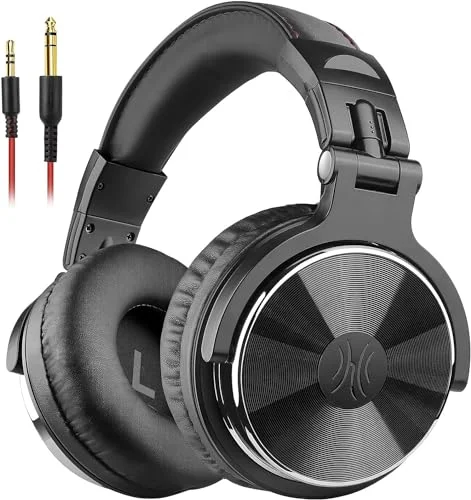
OneOdio Wired DJ Hi-Res Over-Ear Headphones for PC, Keyboard Guitar – Black | headphone wi |

The 50mm drivers and dual-jack setup make this a strong candidate for serious monitoring.
OneOdio’s Wired DJ Headphones use 50mm neodymium drivers to deliver a punchy, detailed sound profile that helps you catch audio nuances during a broadcast. The inclusion of both 3. 5mm and 6. 35mm jacks means you can plug into almost any interface or mixer without hunting for adapters.
The swiveling ear cups are a practical touch, allowing you to slip one cup off your ear to monitor your room audio while keeping the other on for the stream mix.
Comfort is handled well with padded cushions and an adjustable headband, which helps during those multi-hour sessions. The shared audio port is a nice bonus if you ever need to loop in a guest locally. However, being wired-only means you are tethered to your desk.
This is best for streamers who prioritize isolation and consistent audio quality over wireless freedom.
|
2
|
OneOdio A71D Wired Over-Ear Headphones, Hi-Res DJ Studio Headphone | Foldable monitor desi |
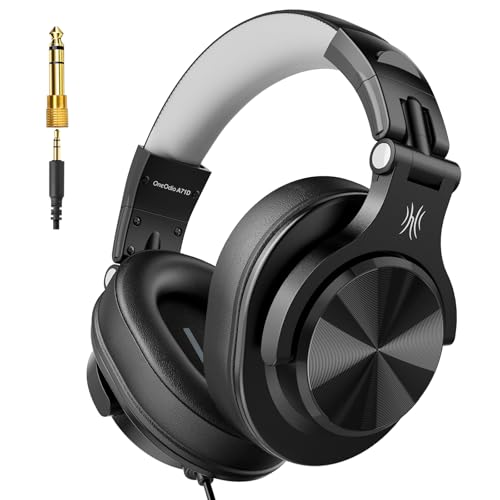
A foldable build and 40mm drivers make this easy to move around without losing audio detail.
The OneOdio A71D strikes a balance between portability and performance. Its 40mm drivers provide clear, balanced audio suitable for mixing or gaming, while the foldable design makes it easy to stash in a backpack.
The 90-degree swiveling ear cups allow for quick single-ear monitoring, and the padded ear muffs help reduce fatigue during longer broadcasts.
This model plays nicely with PCs, mixers, and even instruments, making it versatile for creative streamers. The wired connection ensures zero latency, which is critical for timing-sensitive content. Note that the folding hinge can feel a bit stiff initially, but it generally holds up well.
It is a solid option if you need a reliable pair that travels easily.
|
3
|
OneOdio A70 Bluetooth Over-Ear Headphones, Hi-Res Wired DJ Studio – Black | Wireless over- |

Dual-mode connectivity and long battery life offer flexibility for streamers who move around.
The OneOdio A70 gives you the best of both worlds: wireless convenience and wired reliability. With up to 72 hours of battery life in wireless mode, you are unlikely to run out of juice mid-stream.
The 40mm neodymium drivers and aluminum fascia deliver crisp, high-resolution sound, while the memory foam ear cushions keep things comfortable during marathon sessions.
Being able to switch to wired mode means you never have to worry about charging deadlines during critical broadcasts. The dual-device connectivity is handy for managing chat on one device and game audio on another.
Just keep in mind that Bluetooth range is limited to about 49 feet, so stay close to your source. This is a great pick for those who want wireless ease without sacrificing the safety net of a cable.
|
4
|
OneOdio A71 Hi-Res Wired Over-Ear Studio Headphones for DJ, Mixing – Black | headphone for |

Hi-res audio and a coiled cord keep your desk tidy while delivering professional sound.
The OneOdio A71 focuses on clarity with its 40mm drivers, making it well-suited for studio-style monitoring. The included coiled cord stretches from 6. 6 to 9. 8 feet, which reduces desk clutter compared to long straight cables, and the included plugs mean no adapter hunting.
Swiveling ear cups and soft padding make it practical for long wear.
The shared audio port allows for easy collaboration, though some users might find the coiled cord slightly restrictive if they move around a lot. The lightweight build and good noise isolation make it a strong contender for streamers who need precise audio reproduction without extra bulk.
It is a straightforward, effective tool for focused broadcasting.
|
5
|
TASCAM TH-02 Professional Studio Monitor Headphones, Wired, Over Ear , for Recording, Podc |
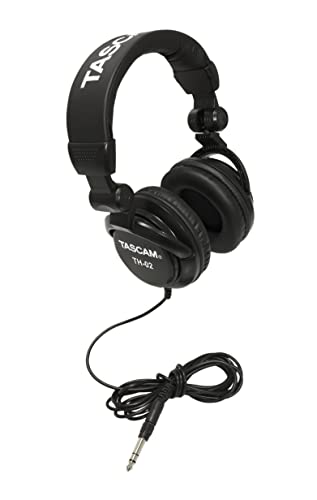
Professional build quality and a compact foldable design suit streamers on the go.
TASCAM’s TH-02 brings a professional pedigree to streaming with its closed-back dynamic design, offering rich bass and clear highs ideal for podcasting or recording. The foldable structure and padded headband make it easy to transport and comfortable to wear. The included snap-on 1/4” adapter expands its compatibility with pro-audio gear.
The tight stitching and robust build suggest it can handle frequent travel. However, the ear pads might feel a bit narrow if you have larger ears, and the isolation isn’t quite as heavy-duty as some competitors.
It is a reliable, rugged choice for streamers who need a portable pair that can withstand the rigors of moving between locations.
|
6
|
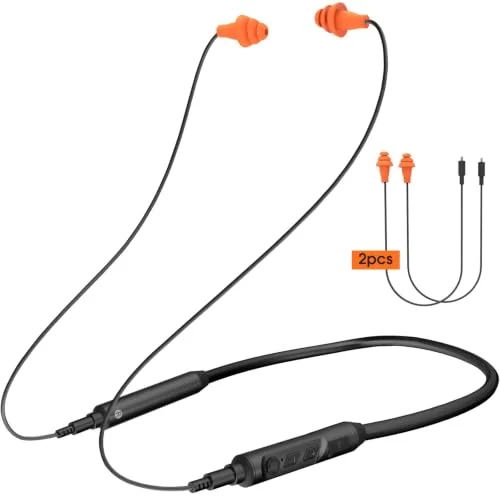
ZORIOXI Open Ear Headphones with Mic, 29g Bluetooth Headset, Air Conduction Headphones wit |

Open-ear design and dual-device pairing keep you aware of your surroundings.
The ZORIOXI Open Ear Headphones take a different approach by using air conduction to keep your ears open to ambient sound. This is useful if you need to hear your family or doorbell while streaming.
The built-in mic and dual-device connection let you switch seamlessly between your phone and PC, and Bluetooth 5. 4 provides a stable link.
At just 29g, these are incredibly light, which minimizes fatigue. However, the open design means zero sound isolation, so your mic might pick up background noise, and you won’t get that immersive audio bubble. The 10-hour battery life is decent but may require charging during very long sessions.
These are best for streamers who prioritize situational awareness over audio immersion.
|
7
|
FIFINE HD8 Wired Studio Monitor Headphone, Detachable 3.5mm/6.35mm Cables | Podcast Headph |

Large drivers and detachable cables offer high-quality sound with easy maintenance.
The FIFINE HD8 uses 50mm drivers to produce dynamic bass and accurate treble, creating an immersive monitoring experience. The closed-back design helps isolate sound, keeping your stream clean from leakage. Detachable cables in both 3. 5mm and 6.
35mm sizes ensure you can connect to virtually any device, and replacing a worn cable is simple.
Weighing in at 265g, these are light enough for extended wear without causing neck strain. The coiled cables can tangle if you are not careful, but the ergonomic fit helps prevent sound leakage. This is a strong option for streamers who want reliable, high-fidelity audio without unnecessary frills.
|
8
|
PHILIPS Over Ear Open Back Stereo Headphones Wired with Detachable Audio Jack, Studio Moni |

Open-back design and 50mm drivers create a spacious soundstage for home studios.
The Philips SHP9600 features an open-back design with 50mm drivers tuned for natural, spacious sound. The drivers are aligned to match the ear’s geometry, which helps preserve detail across the frequency range.
This setup is ideal for home studios where sound leakage is not a concern, offering a more natural listening experience than closed-back models.
Comfort is a major strength here, with breathable materials and a self-adjusting headband that fits most head shapes well. However, the open-back design offers no noise isolation, so it is not suitable for noisy environments or situations where mic bleed is an issue.
It is best for streamers in quiet, controlled spaces who value soundstage width.
|
9
|
Kensington Hi-Fi On-Ear Headphones with 9-Foot Cord, 3.5mm Jack Headset (K33137) |

Long cord and durable build make this a steady choice for fixed desktop setups.
Kensington’s Hi-Fi Headphones deliver deep bass and a wide dynamic range through 40mm drivers. The 9-foot cord and gold-plated plug ensure a reliable connection and enough reach to move around your desk comfortably. Padded ear cushions and a sturdy headband provide consistent comfort for long periods.
The on-ear design might not appeal to everyone, and the lack of swiveling cups limits single-ear monitoring options. However, the sealed earpads do a decent job of reducing sound leakage. This is a practical, no-nonsense choice for streamers with a stationary setup who need durability and length.
These headphones address the core challenges of streaming: maintaining audio clarity, staying comfortable for hours, and surviving daily use. Whether you need wireless flexibility or studio-grade isolation, there is a model here that fits your workflow.
How to Test Headphones Before Your First Stream
Before you go live, take a moment to verify your setup. A quick check can save you from technical issues mid-broadcast.
Connect the headphones to your streaming setup and verify all jacks or Bluetooth pairings work seamlessly.
Play a variety of audio tracks to test bass, mids, and highs for clarity and balance.
Wear them for at least an hour to assess comfort and identify any pressure points.
Test the mic if included, ensuring clear voice pickup and minimal background noise.
Check for sound leakage by recording your stream and listening for audio bleed into the mic.
Simulate your actual streaming conditions. Move around in your chair, adjust the headband, and test single-ear monitoring if your headphones support it. Give the cables a gentle tug to ensure the connections are secure.
For wireless models, check the battery level and test the range by moving away from your PC. Fixing these small issues beforehand prevents awkward interruptions during your stream.
Common Streaming Headphone Mistakes to Avoid
Even experienced streamers can fall into common traps with their audio gear. Avoiding these mistakes can save you frustration.
- Avoid cheap cables that fray easily, opt for reinforced or detachable options.
- Don’t ignore impedance mismatches; high-impedance headphones may need an amplifier.
- Skip open-back designs in noisy environments; they leak sound and pick up ambient noise.
- Never assume wireless headphones will last a full stream, always test battery life beforehand.
- Don’t overlook ear cup swivel range; limited movement can hinder monitoring flexibility.
Do not let flashy designs distract you from functionality. Some stylish headphones lack the durability or audio neutrality needed for professional streaming. Also, avoid headphones with proprietary or non-standard jacks unless you are sure your interface supports them. Finally, remember to clean your ear cushions regularly.
Sweat and oils build up quickly during long sessions, leading to discomfort and hygiene issues.
Maintaining Your Headphones for Longevity
Taking care of your headphones extends their life and keeps them sounding fresh. A few simple habits go a long way.
Maintenance Tips by Component
| Component | Maintenance Task | Frequency |
|---|---|---|
| Ear Cushions | Wipe with damp cloth, mild soap | Weekly |
| Cables | Check for fraying, store loosely coiled | Monthly |
| Headband | Adjust gently, avoid over-stretching | As Needed |
| Drivers | Keep dry, avoid extreme temperatures | Always |
| Jacks/Plugs | Clean contacts with isopropyl alcohol | Biannually |
Store your headphones in a dry, cool place away from direct sunlight, which can degrade the ear pad materials. If they are foldable, use a case to protect them when traveling. For wired models, avoid wrapping the cable tightly around the headphones, as this stresses the internal wires.
Periodically check the hinges and joints for signs of wear, as these are the most common points of failure.
The right headphones make streaming smoother and more enjoyable. Test your chosen pair with your specific setup before your next broadcast to ensure everything sounds right. This preparation helps you focus on your content rather than worrying about technical glitches.

Leave a Reply